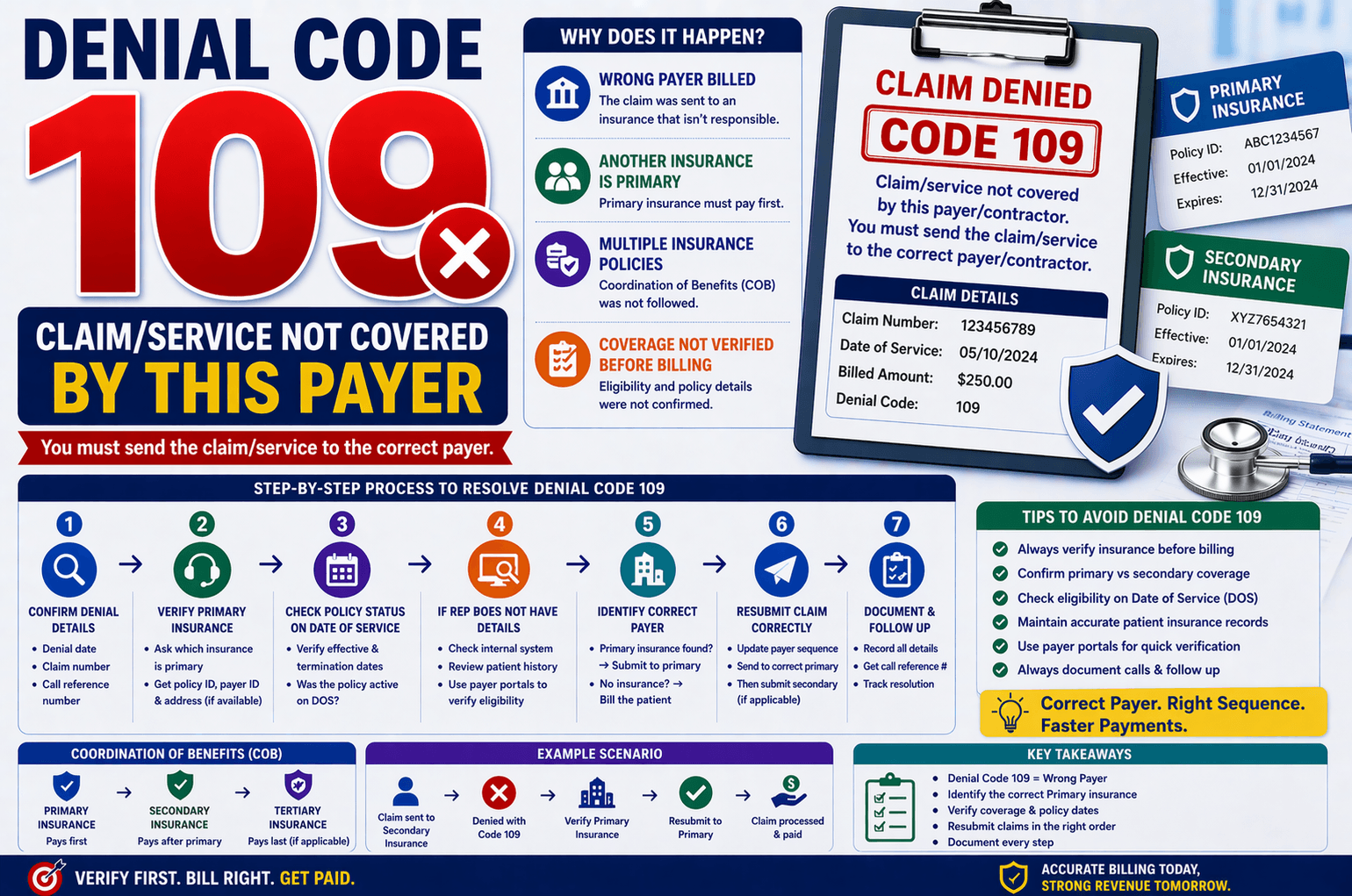
In medical billing, denial codes are a common challenge that can delay payments and disrupt revenue cycles. One such denial is Code 109: “Claim/service not covered by this payer/contractor. You must send the claim/service to the correct payer/contractor.”
This denial typically occurs when a claim is submitted to the wrong insurance company. While it may sound straightforward, resolving it requires careful verification of insurance details, coordination of benefits (COB), and proper claim resubmission.
This guide breaks down denial code 109 in simple terms and provides a step-by-step workflow to resolve it efficiently.
What Does Denial Code 109 Mean?
Denial code 109 indicates that the insurance company you billed is not responsible for paying the claim.
Common Reasons:
The wrong payer was billed
Another insurance is primary
The patient has multiple insurance policies
Coverage details were not verified before billing
In short, the payer is telling you: “We are not the correct insurance—bill someone else.”
Understanding Primary vs Secondary Insurance
Before resolving this denial, it’s essential to understand Coordination of Benefits (COB).
Key Concepts:
Primary Insurance: Pays first
Secondary Insurance: Pays after the primary processes the claim
Tertiary Insurance (if applicable): Pays last
Example:
If a patient has:
Employer insurance → Primary
Spouse’s insurance → Secondary
Submitting the claim directly to the secondary insurer will result in denial code 109.
Step-by-Step Process to Resolve Denial Code 109
- Confirm the Denial Details
Start by gathering basic information:
Denial date
Claim number
Call reference number
This ensures proper documentation and follow-up.
- Verify Primary Insurance
Ask the payer representative:
Which insurance is primary?
Do they have details of the primary payer?
Two Possible Scenarios:
Scenario A: Representative Has Details
If the rep provides primary insurance details:
Policy ID
Payer ID
Mailing address
Then proceed to:
Check policy effective and termination dates
Verify if the policy was active on Date of Service (DOS)
- Check Policy Status on Date of Service
If Policy Was Active:
Update the correct insurance as primary
Submit the claim to the primary payer
If Policy Was Not Active:
Request the payer to reprocess the claim
Clarify that no valid primary insurance existed on DOS
- If Representative Does Not Have Details
When the payer cannot provide primary insurance information:
Take These Steps:
Check your internal system for:
Other insurance records
Patient payment history
Look for any previously billed insurance
If Another Insurance Is Found:
Verify eligibility
Confirm if it is active on DOS
Submit the claim to that payer
If No Insurance Found:
Release the claim to the patient (self-pay)
- Use Payer Portals for Verification
If you have access to insurance portals:
Check eligibility directly online
Confirm:
Coverage status
Policy dates
Coordination of benefits
This step reduces dependency on call center reps and speeds up resolution.
- Resubmit the Claim Correctly
Once the correct primary insurance is identified:
Update billing system
Assign correct payer sequence
Resubmit claim to primary insurance
If needed:
Submit secondary claim after primary processing
Important Tips for Avoiding Denial Code 109
Preventive Measures:
Always verify insurance before billing
Confirm primary vs secondary coverage
Check eligibility on DOS
Maintain updated patient insurance records
During Follow-Up Calls:
Always request:
Claim number
Call reference number
Document every interaction for audit purposes
Real-Life Example
Situation:
A claim is submitted to Insurance B and gets denied with code 109.
Investigation:
You call Insurance B and learn:
Insurance A is actually primary
Action Taken:
Verify Insurance A eligibility
Confirm policy active on DOS
Submit claim to Insurance A
Outcome:
Claim gets processed and paid successfully.
Key Takeaways
Denial code 109 means wrong payer billed
Always identify the correct primary insurance
Verify eligibility and coverage dates
Use payer portals when available
If no valid insurance exists, bill the patient
Frequently Asked Questions (FAQs)
- What is denial code 109 in medical billing?
It indicates that the claim was sent to the wrong payer, and another insurance is responsible for payment. - How do I find the correct primary insurance?
You can:
Ask the payer representative
Check your billing system
Review patient history
Use payer portals - What if no primary insurance is active?
If no insurance is active on the date of service, request reprocessing or bill the patient directly. - Can I resubmit the claim to the same payer?
Only if they confirm they are primary or agree to reprocess due to incorrect denial. - How can I prevent denial code 109?
Verify insurance before submission
Confirm COB details
Maintain accurate patient records
Conclusion:
Denial code 109 is a common but manageable issue in medical billing. The key to resolving it lies in accurate insurance verification and proper claim routing. By following a structured approach—verifying primary insurance, checking eligibility, and resubmitting correctly—you can reduce delays and improve claim success rates.
Implementing preventive measures and maintaining thorough documentation will not only minimize denials but also strengthen your overall revenue cycle management.