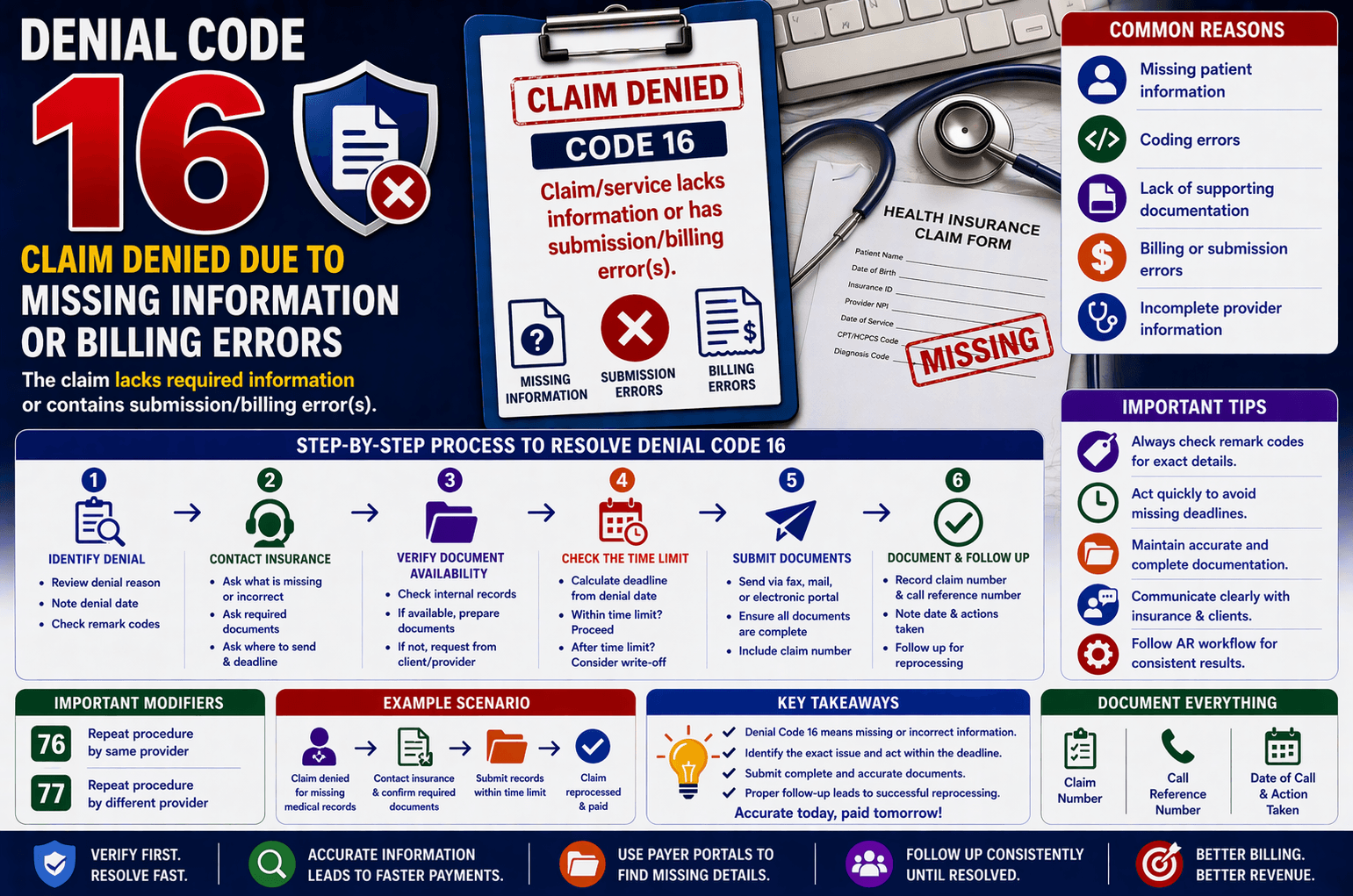
Healthcare billing and insurance claims can be complex, especially when claims are denied due to missing information or submission errors. One of the most common denial reasons is “Claim/service lacks information or has submission/billing error(s)”. Understanding how to handle this denial efficiently is essential for healthcare providers, billing professionals, and revenue cycle teams.
In this guide, we’ll break down what this denial means, why it happens, and how to resolve it step by step in a simple and practical way.
Introduction
When an insurance company denies a claim citing missing information or billing errors, it usually means that something important was either left out or incorrectly submitted. This could be anything from incomplete patient details to missing documentation or coding mistakes.
If not handled properly, such denials can delay payments or even lead to revenue loss. However, with a structured approach, these claims can often be corrected and resubmitted successfully.
What Does This Denial Mean?
This denial indicates that the insurance payer cannot process the claim because:
Required information is missing
Submitted data is incorrect or inconsistent
Supporting documents were not provided
In simple terms, the insurer is saying:
“We need more or correct information before we can process this claim.”
Common Reasons for This Denial
Understanding the root cause is the first step toward resolution. Here are the most common reasons:
- Missing Patient Information
Incorrect or incomplete patient name
Missing date of birth or insurance ID - Coding Errors
Incorrect CPT/HCPCS codes
Diagnosis codes not matching the procedure - Lack of Supporting Documentation
Medical records not submitted
Missing authorization forms - Billing Errors
Duplicate claims
Incorrect billing format - Incomplete Provider Details
Missing NPI (National Provider Identifier)
Incorrect provider address
Step-by-Step Process to Handle the Denial
Handling this denial requires a structured approach. Below is a practical workflow often used in real-world billing scenarios:
Step 1: Identify the Denial Details
Start by reviewing the claim carefully.
Check the denial reason
Note the denial date
Review any remark codes
Remark codes often give more specific details than the denial description.
Step 2: Contact the Insurance Company
Ask the following key questions:
What exactly is missing or incorrect?
What documents are required?
Where should the documents be sent (Fax/Mail)?
What is the deadline to submit documents?
This ensures you have complete clarity before taking action.
Step 3: Verify Document Availability
Now check internally:
Are the required documents available?
Are they complete and accurate?
If documents are available:
Prepare them for submission
If not:
Contact the client or provider to obtain them
Step 4: Check the Time Limit
Every insurance company sets a timeframe for submitting corrections or additional documents.
Calculate the deadline using the denial date
Compare it with the current date
If within the time limit → Proceed with submission
If time limit is crossed → Consider writing off (unless client requests otherwise)
Step 5: Submit the Documents
Send the required documents through:
Fax
Mailing address
Electronic submission (if available)
Make sure:
All documents are clear and complete
Claim number is included
Step 6: Document the Process
Always record:
Claim number
Call reference number
Date of communication
Actions taken
This helps in future follow-ups and audits.
Important Tips for Successful Resolution
Here are some expert tips to improve your success rate:
Always Check Remark Codes
Remark codes often provide exact reasons for denial. Don’t rely only on the general description.
Act Quickly
Delays can lead to missed deadlines and lost revenue.
Maintain Proper Documentation
Keep all records organized for easy access.
Communicate Clearly
Ensure proper communication with both insurance and clients.
Follow AR (Accounts Receivable) Workflow
Use a standardized AR process to handle each denial efficiently.
Example Scenario
Let’s understand this with a simple example:
Situation:
A claim is denied because medical records were not submitted.
Action Taken:
Billing team checks denial date
Calls insurance and confirms required documents
Finds records available internally
Verifies submission deadline
Sends documents via fax within time limit
Documents claim number and reference number
Result:
Claim is reprocessed and paid.
Frequently Asked Questions (FAQs)
- What should I do first after receiving this denial?
Start by reviewing the denial reason and checking the remark codes. Then contact the insurance company for clarification. - Can I resubmit the claim without contacting the payer?
It’s not recommended. Always confirm what is missing to avoid repeated denials. - What happens if the time limit is crossed?
In most cases, the claim may need to be written off. However, some clients may still request submission. - How important are remark codes?
Very important. They often provide precise details that help identify the exact issue. - Can missing documents always be corrected?
Yes, if submitted within the allowed timeframe and in the correct format.
Conclusion:
Denials due to missing information or billing errors are common but manageable. The key lies in understanding the root cause, acting quickly, and following a structured workflow.
By:
Verifying denial details
Communicating with insurance
Submitting accurate documents on time
Following proper AR procedures
You can significantly improve claim approval rates and reduce revenue loss.
Mastering this process not only ensures faster reimbursements but also strengthens your overall revenue cycle management.