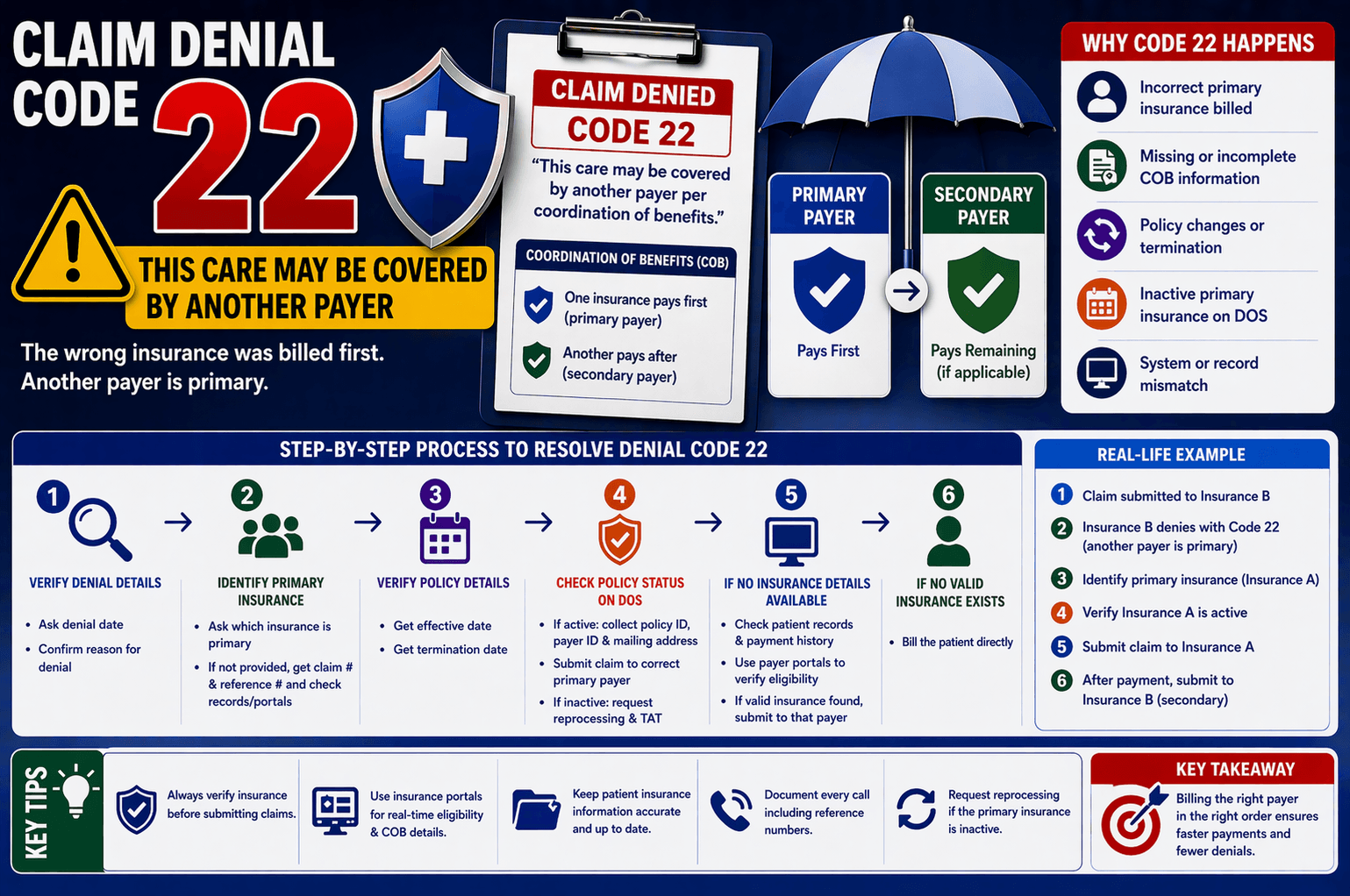
In medical billing, claim denials are common, but understanding why they occur is key to resolving them efficiently. One such denial is Code 22, which states: “This care may be covered by another payer per coordination of benefits (COB).”
If you’re new to healthcare billing or revenue cycle management, this message can seem confusing. Simply put, it means the insurance company believes another insurer should pay first before they process the claim.
This article breaks down everything you need to know about denial code 22, including what it means, why it happens, and how to resolve it step-by-step.
What is Denial Code 22?
Denial Code 22 occurs when a claim is rejected because the payer believes:
The patient has more than one insurance policy, and
The wrong insurance was billed as primary
This situation falls under Coordination of Benefits (COB), which determines the order in which multiple insurers pay claims.
Understanding Coordination of Benefits (COB)
COB is a process used when a patient has multiple insurance policies. It ensures:
One insurance acts as primary (pays first)
Another acts as secondary (pays remaining balance, if applicable)
Example:
A patient has insurance through their employer and their spouse
The employer’s insurance is primary
The spouse’s insurance is secondary
If a claim is mistakenly sent to the secondary payer first, it will likely be denied with Code 22.
Common Reasons for Denial Code 22
Here are the most frequent causes:
- Incorrect Primary Insurance
The claim was submitted to the wrong insurance company first. - Missing COB Information
The payer does not have updated details about the patient’s other insurance. - Policy Changes
The patient may have:
Changed insurance recently
Added or terminated a policy - Inactive Primary Insurance
The primary insurance might be inactive on the Date of Service (DOS). - System Mismatch
Insurance records between providers and payers may not match.
Step-by-Step Process to Resolve Denial Code 22
Handling this denial requires a structured approach. Below is a simplified workflow based on real call-handling scenarios:
Step 1: Verify Denial Details
Ask:
What is the denial date?
Why was the claim denied?
Step 2: Identify Primary Insurance
Ask the representative:
Which insurance is primary?
If details are available:
Proceed with verification.
If not:
Request:
Claim number
Call reference number
Check internal systems or patient history
Step 3: Verify Policy Details
If the representative provides insurance details:
Ask:
What is the effective date?
What is the termination date?
Step 4: Check Policy Status on DOS
If policy is active:
Collect:
Policy ID
Payer ID
Mailing address
Resubmit claim to the correct primary payer
If policy is inactive:
Request payer to reprocess the claim
Confirm turnaround time (TAT)
Step 5: If No Insurance Details Are Available
Take these actions:
Check patient records for:
Other insurance policies
Payment history
Use payer portals (if accessible) to verify eligibility
If another active insurance is found:
Submit claim to that payer
If no valid insurance exists:
Bill the patient directly
Important Tips for Handling Code 22
To avoid repeated denials, keep these best practices in mind:
Always Verify Insurance Before Submission
Confirm:
Primary vs secondary payer
Policy status
Coverage dates
Use Insurance Portals
Online portals often provide:
Real-time eligibility
Updated COB details
Maintain Accurate Patient Records
Ensure:
All insurance details are current
Changes are updated promptly
Document Every Call
Always note:
Claim number
Reference number
Representative details
Reprocess When Necessary
If the primary insurance is inactive or incorrect:
Request reprocessing instead of resubmitting blindly
Real-Life Example
Let’s simplify with a quick scenario:
A claim is submitted to Insurance B.
Insurance B denies it with Code 22, stating another payer is primary.
What to do:
Contact Insurance B
Identify primary insurance (Insurance A)
Verify Insurance A is active
Submit claim to Insurance A
After payment, bill Insurance B (secondary)
Frequently Asked Questions (FAQs)
- What does “another payer is primary” mean?
It means the insurance you billed is not responsible for paying first. Another insurance must be billed before it. - How do I find the primary insurance?
You can:
Ask the payer representative
Check patient records
Use insurance portals - What if the primary insurance is inactive?
If inactive on the date of service:
Request reprocessing from the current payer
Or bill the patient if no valid insurance exists - Can I resubmit the claim to the same payer?
Only if:
COB information is corrected
Or the payer agrees to reprocess - What happens if both insurances deny the claim?
You must:
Recheck COB accuracy
Verify eligibility
Possibly escalate or bill the patient
Conclusion:
Denial Code 22 is not an error—it’s a signal that the billing order is incorrect. By understanding Coordination of Benefits and following a structured workflow, you can resolve these denials efficiently.
The key is to:
Identify the correct primary insurance
Verify eligibility
Submit claims in the proper order
With consistent verification and proper documentation, you can significantly reduce such denials and improve your billing success rate.