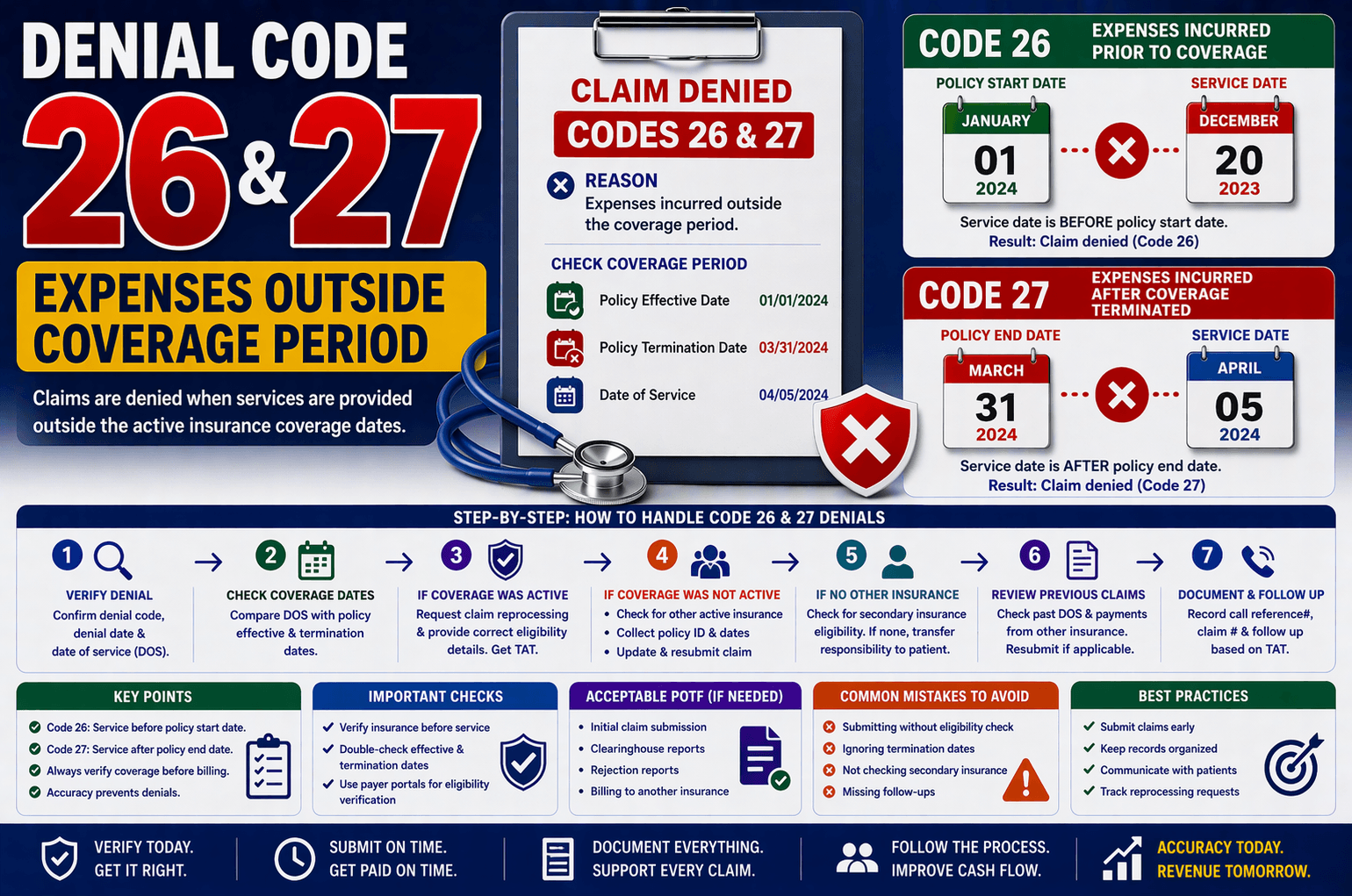
In medical billing, claim denials are common—but understanding why they happen is critical for faster resolution and improved revenue cycle performance. Among the frequent denial reasons are Denial Code 26 (Expenses incurred prior to coverage) and Denial Code 27 (Expenses incurred after coverage terminated).
These denials occur when a patient receives services outside the active insurance coverage period. While this may seem straightforward, resolving such denials requires careful verification, communication, and sometimes corrective resubmission.
This guide breaks down everything you need to know about Denial Codes 26 and 27 in simple, beginner-friendly terms.
What Are Denial Codes 26 and 27?
Denial Code 26: Expenses Incurred Prior to Coverage
This denial is triggered when the date of service (DOS) is before the policy’s effective (start) date.
Example:
Policy start date: January 1, 2024
Service date: December 20, 2023
Result: Claim denied under Code 26
Denial Code 27: Expenses Incurred After Coverage Terminated
This occurs when the DOS falls after the policy termination date.
Example:
Policy end date: March 31, 2024
Service date: April 5, 2024
Result: Claim denied under Code 27
Why Do These Denials Occur?
These denials usually happen due to:
Incorrect or outdated insurance information
Delayed updates in payer systems
Coverage lapses or policy termination
Human error during claim submission
Coordination of benefits issues
Even a small mismatch in dates can lead to denial, making verification essential.
Step-by-Step Process to Handle These Denials
Handling these denials efficiently requires a structured approach. Here’s how professionals typically resolve them:
- Verify the Denial Details
Start by confirming:
Denial date
Date of service (DOS)
Policy effective date
Policy termination date
Goal: Check whether the service truly falls outside the coverage period. - Compare Dates Carefully
If DOS falls within the coverage period → denial may be incorrect
If DOS is outside coverage → proceed to next steps - If Coverage Was Active on DOS
If you confirm the policy was active:
Request claim reprocessing
Provide correct eligibility details
Ask for Turnaround Time (TAT)
Example request:
“Since the policy was active on the date of service, can you please reprocess the claim?”
- If Coverage Was Not Active
If the denial is valid:
Check for Other Active Insurance
Ask if the patient had another policy active on the DOS
Collect:
Policy ID
Effective and termination dates
If found:
Update insurance details
Resubmit the claim
- If No Other Coverage Exists
If no active insurance is available:
Prepare to transfer financial responsibility to the patient
Before doing so:
Check if any secondary insurance exists
Verify eligibility through payer portals - Review Previous Claims
Always check:
Previous dates of service (DOS)
Any payments received from other insurance
If payment was made previously:
Confirm eligibility
Resubmit claim to the appropriate payer
Real-Life Scenario Example
Let’s simplify this with a practical scenario:
Situation:
A claim is denied stating coverage terminated.
Action Steps:
You call the insurance representative
Ask for:
Denial date
Policy effective & termination dates
Compare with DOS
Outcome 1:
DOS is within coverage → Request reprocessing
Outcome 2:
DOS is outside coverage →
Check for alternate insurance
If none → Bill patient
Key Tips for Avoiding These Denials
Prevention is always better than correction. Here are some proven tips:
Verify Insurance Before Service
Always confirm eligibility prior to appointments
Double-Check Dates
Ensure policy effective and termination dates are accurate
Maintain Updated Records
Keep insurance information current in your system
Use Eligibility Portals
Cross-check details using payer websites
Communicate Clearly with Patients
Ask about recent insurance changes
Track Reprocessing Requests
Set follow-ups based on TAT provided
Common Mistakes to Avoid
Submitting claims without eligibility verification
Ignoring termination dates
Not checking for secondary insurance
Skipping follow-ups after reprocessing requests
Assuming denial is always correct
Frequently Asked Questions (FAQs)
- What is the main difference between Denial Code 26 and 27?
Code 26 applies when services occur before coverage starts, while Code 27 applies when services occur after coverage ends. - Can these denials be overturned?
Yes—if you can prove the policy was active on the date of service, you can request claim reprocessing. - What should I do if the patient has multiple insurances?
Check all available policies and identify which one was active on the DOS. Update and resubmit accordingly. - Is the patient always responsible if coverage is inactive?
Not always. First, confirm if any secondary or alternate insurance exists before billing the patient. - What is TAT in reprocessing?
TAT stands for Turnaround Time—the time the insurance company takes to review and reprocess the claim.
Conclusion:
Denial Codes 26 and 27 are among the most common yet avoidable claim denials in medical billing. They stem primarily from mismatched coverage dates—but resolving them requires attention to detail, proper verification, and systematic follow-up.
By understanding how to analyze coverage periods, verify eligibility, and explore alternate insurance options, you can significantly reduce revenue loss and improve claim success rates.
A proactive approach—combined with accurate data and strong communication—will help you handle these denials efficiently and prevent them in the future.