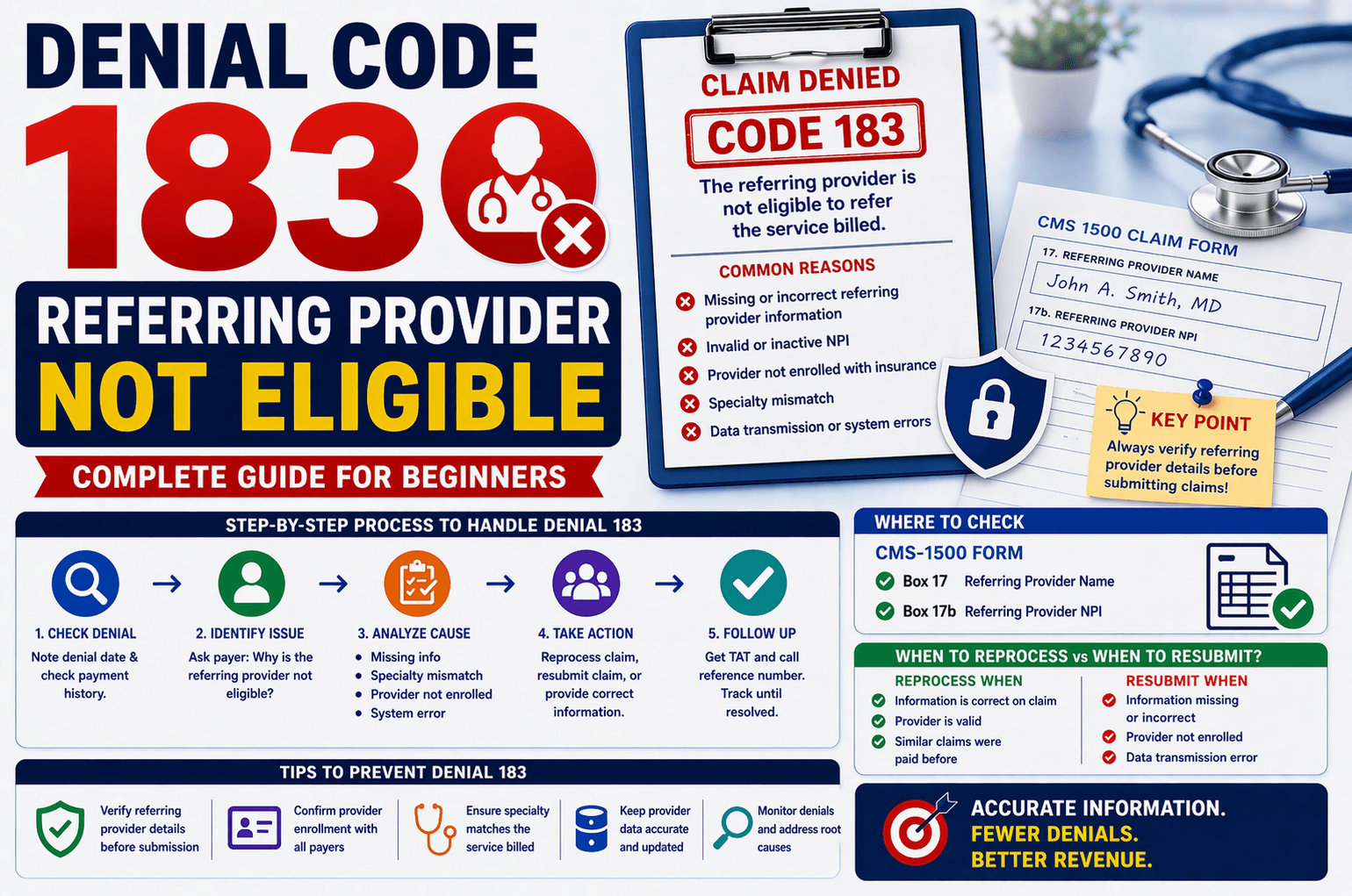
In medical billing, claim denials are common—but understanding why they happen is the key to fixing them quickly. One such denial is Code 183: “The referring provider is not eligible to refer the service billed.”
If you’re new to healthcare billing or revenue cycle management, this message can feel confusing. What does “not eligible” mean? Is it a credentialing issue, a documentation gap, or something else entirely?
This guide breaks down Denial 183 in simple terms, explains the root causes, and provides step-by-step actions to resolve and prevent it.
What is Denial Code 183?
Denial Code 183 occurs when an insurance payer determines that the referring provider listed on the claim is not authorized or qualified to refer the billed service.
This can happen due to several reasons, including:
Missing or incorrect provider details
Provider not enrolled with the insurance plan
Specialty mismatch
Invalid or inactive provider credentials
Why Does Denial 183 Happen?
Understanding the cause is crucial before taking action. Below are the most common reasons:
- Missing Referring Provider Information
If the claim does not include proper referring provider details, it may be denied.
Where to check:
CMS-1500 form
Box 17 → Referring Provider Name
Box 17b → NPI (National Provider Identifier)
Example:
A radiology service requires a referring physician, but the claim is submitted without that information.
- Incorrect or Invalid NPI
If the NPI entered is incorrect, inactive, or not recognized by the payer, the claim will be rejected.
Example:
Entering a typo in the NPI number or using an outdated provider record.
- Referring Provider Not Enrolled with Insurance
Even if the provider is valid, they must be credentialed and enrolled with the specific insurance plan.
Example:
A physician refers a patient but is not enrolled with that insurance payer or group network.
- Specialty Mismatch
Insurance companies require that the referring provider’s specialty aligns with the service billed.
Example:
A general physician referring a highly specialized procedure that requires a specialist referral.
- Data Transmission Errors
Sometimes the information exists on the claim form but does not transmit correctly due to system or clearinghouse issues.
Step-by-Step Workflow to Handle Denial 183
Here’s a simplified process you can follow when handling this denial:
Step 1: Check Denial Date and Payment History
Verify when the denial occurred
Check if similar claims with the same referring provider were previously paid
If YES:
Request reprocessing of the claim
If NO:
Move to root cause analysis
Step 2: Identify the Exact Issue
Ask the payer:
“Why is the referring provider not eligible to refer this service?”
Possible responses:
Missing information
Incorrect specialty
Provider not enrolled
Step 3: Take Action Based on the Cause
A. Information Missing on Claim
Verify CMS-1500 form
If available:
Request claim reprocessing
If not available:
Resubmit claim with correct details
B. Specialty Mismatch
Check provider specialty (via official provider databases)
Compare with CPT code requirements
If matches:
Request reprocessing
If not:
Obtain correct referring provider details from client
C. Provider Not Enrolled
Confirm enrollment status
Next steps:
Ask client to:
Enroll provider with insurance
OR provide alternative referring provider
D. System/Error Issue
If information exists but payer cannot see it:
Resubmit the claim
Inform client if issue persists
Step 4: Contact Payer and Document
Always collect:
Claim Number
Call Reference Number
Representative Name (if possible)
Also ask:
“What is the turnaround time (TAT) for reprocessing?”
Important Tips to Prevent Denial 183
Preventing denials saves time and revenue. Here are some best practices:
Verify Referring Provider Before Submission
Ensure name and NPI are accurate
Double-check CMS-1500 fields
Confirm Provider Enrollment
Validate that the provider is enrolled with the payer
Match Specialty with Service
Ensure the referring provider is qualified for the service billed
Use Updated Provider Data
Maintain a clean and updated provider database
Monitor Frequent Denials
Track recurring issues and fix root causes
Real-Life Example
Scenario:
A diagnostic lab submits a claim for imaging services. The claim gets denied with Code 183.
Investigation:
Referring provider NPI is correct
However, provider is not enrolled with the insurance plan
Resolution:
Client provides alternate enrolled provider
Claim is corrected and resubmitted
Payment is successfully processed
Frequently Asked Questions (FAQs)
- What does “not eligible to refer” actually mean?
It means the insurance payer does not recognize the referring provider as authorized to refer that specific service—due to credentialing, specialty, or data issues. - Can a claim be reprocessed without resubmission?
Yes, if:
The referring provider is valid
And similar claims were previously paid
In such cases, you can request reprocessing instead of resubmission. - How do I verify a provider’s specialty?
You can check official provider registries or databases where provider credentials and specialties are listed. Compare this with the CPT code requirements. - What if the provider is not enrolled?
You have two options:
Get the provider enrolled with the insurance
Or use a different eligible referring provider - What if all information is correct but denial still occurs?
This could be a system or transmission error. In that case:
Resubmit the claim
Escalate to payer if issue persists
Conclusion:
Denial Code 183 may seem complex at first, but it becomes manageable once you understand its core causes—missing data, enrollment issues, or specialty mismatches.
The key to resolving this denial efficiently lies in:
Accurate claim submission
Proper provider validation
Clear communication with payers
By following a structured workflow and applying preventive checks, you can significantly reduce the occurrence of this denial and improve your claim success rate.
If you handle medical billing regularly, mastering denials like Code 183 is an essential step toward becoming more efficient and confident in your role.