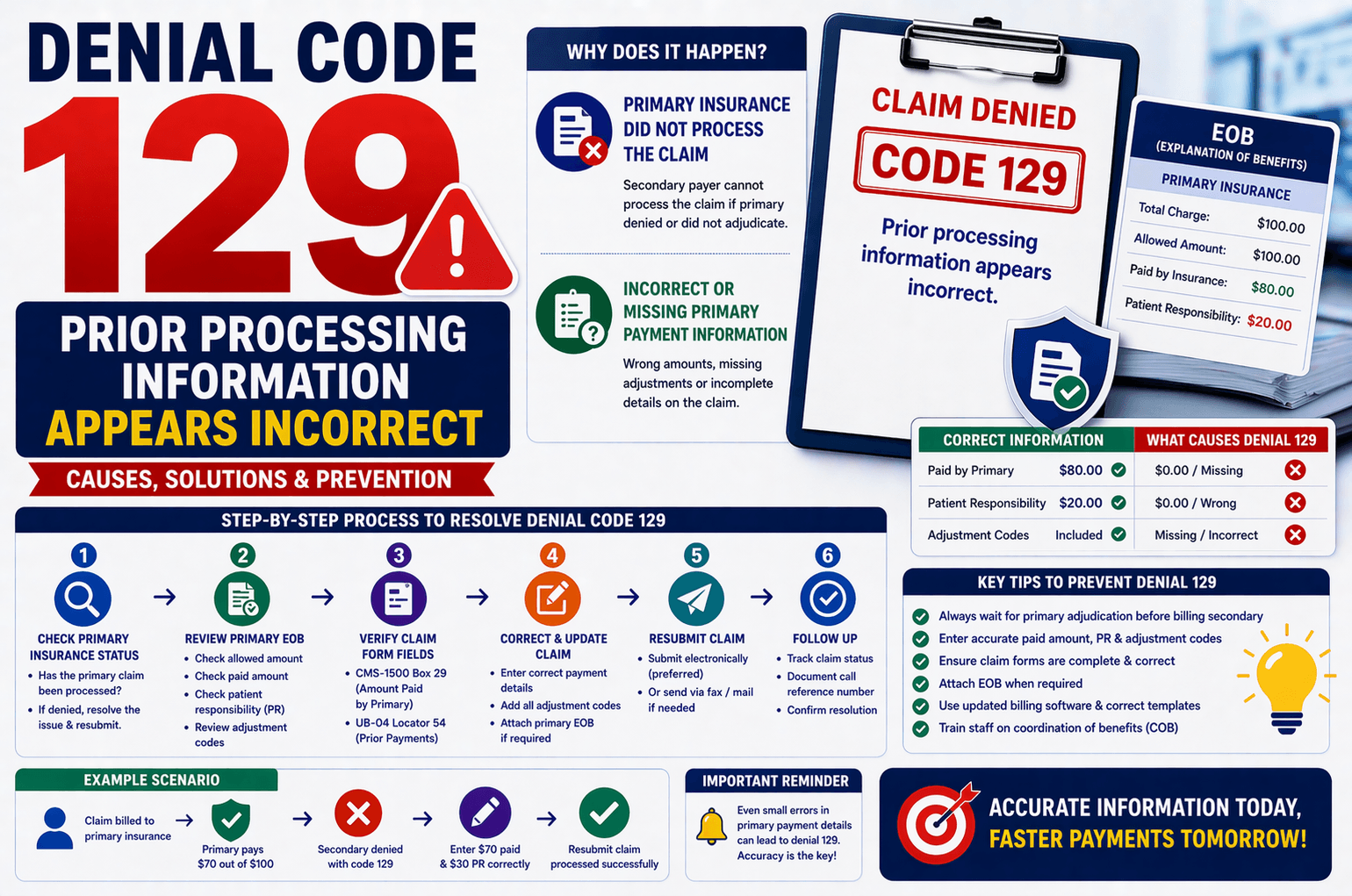
Denial Code 129 is a common issue in medical billing, especially when dealing with secondary or tertiary insurance claims. This denial typically indicates that the information related to the primary insurance processing is either missing, incorrect, or inconsistent when submitted to the next payer.
For beginners in revenue cycle management (RCM), understanding how to identify and resolve this denial is essential to ensure timely reimbursements and reduce claim rejections.
In this guide, we’ll break down Denial Code 129 in simple terms, explain why it occurs, and provide step-by-step solutions to fix it efficiently.
What is Denial Code 129?
Denial Code 129 means:
“Prior processing information appears incorrect.”
In simple words, the secondary insurance company is unable to process the claim because the details of how the primary insurance handled the claim are either:
Missing
Incorrect
Incomplete
Why Does Denial Code 129 Occur?
There are two primary reasons for this denial:
- Primary Insurance Did Not Process the Claim
Secondary insurance companies rely on the primary insurer’s decision before processing a claim.
Example:
Total charge: $100
Primary insurance:
Allowed: $100
Paid: $80
Patient Responsibility (PTR): $20
In this case, the secondary insurance should process the remaining $20.
However, if the primary insurance denies the claim entirely, the secondary payer cannot proceed. This triggers Denial Code 129.
- Incorrect or Missing Primary Payment Information
Even if the primary insurance has paid correctly, Denial 129 may still occur if:
Payment details are not included
Incorrect amounts are entered
Required fields are left blank
Common Errors:
Wrong paid amount entered
Missing adjustment details
Incorrect patient responsibility (copay, coinsurance, deductible)
How to Work on Denial Code 129
Let’s walk through a step-by-step approach to resolve this denial.
Step 1: Check Primary Insurance Status
Before doing anything else, verify whether the primary insurance has processed the claim.
If Primary Claim is Denied:
Identify the denial reason from the primary payer
Correct the issue (e.g., coding error, eligibility issue, missing documentation)
Resubmit the claim to primary insurance
Wait for proper adjudication
Only after the primary processes the claim correctly should you bill the secondary payer.
Step 2: Review Explanation of Benefits (EOB)
Carefully analyze the EOB or ERA from the primary insurance.
Check for:
Allowed amount
Paid amount
Patient responsibility (PR)
Adjustment codes
Make sure all this data is accurate and complete.
Step 3: Verify Claim Form Fields
When billing secondary insurance, the primary payment details must be correctly entered in the claim form.
For Professional Claims (CMS-1500):
Box 29 → Amount Paid by Primary Insurance
For Institutional Claims (UB-04):
Locator 54 → Prior Payments
Ensure these fields reflect the exact payment information from the primary EOB.
Step 4: Correct and Resubmit the Claim
If you find errors:
Update the claim with accurate payment details
Include all necessary adjustment codes
Attach primary EOB if required
Then:
Resubmit electronically (preferred)
Or send via fax/mail if electronic submission fails
Step 5: Handle Special Scenarios
Some cases require extra attention:
Non-Covered Services (PR Denials)
If primary denies as patient responsibility (PR):
Secondary may still pay depending on benefits
Always submit with correct denial codes
Missing Data Issues
If your billing system is not populating payment fields:
Check software configuration
Update claim templates
Contact IT or billing software support
Key Tips to Prevent Denial Code 129
Always wait for primary insurance adjudication before billing secondary
Double-check payment and adjustment details
Ensure claim forms are accurately populated
Attach EOB when required
Use updated billing software with proper mapping
Train billing staff on coordination of benefits (COB)
Real-Life Example
Let’s simplify with a quick scenario:
Scenario:
Claim billed to primary insurance
Primary pays $70 out of $100
Patient responsibility: $30
Mistake:
Claim sent to secondary without entering the $70 payment
Result:
Denial Code 129
Fix:
Update claim with:
Paid amount: $70
Patient responsibility: $30
Resubmit claim → processed successfully
Frequently Asked Questions (FAQs)
- Can I bill secondary insurance if primary denies the claim?
No. You must first resolve the denial with the primary insurance unless it is a valid patient responsibility (PR) denial that the secondary may cover. - What documents are required to fix Denial Code 129?
Typically:
Primary EOB or ERA
Corrected claim form
Supporting documents (if needed)
- Where should I enter primary payment details?
CMS-1500: Box 29
UB-04: Locator 54
- Will secondary insurance always pay after correction?
Not always. Payment depends on:
Patient’s secondary insurance benefits
Coverage rules
Coordination of benefits (COB)
- How long does it take to resolve this denial?
It depends on:
How quickly primary issues are resolved
Resubmission turnaround time
Payer processing timelines
Usually, it can take 1–4 weeks.
Conclusion:
Denial Code 129 may seem complex at first, but it primarily revolves around one key concept: accurate and complete primary insurance information.
By ensuring that:
The primary claim is properly processed
Payment details are correctly entered
Claim forms are complete
—you can significantly reduce the chances of this denial.
For beginners in medical billing, mastering Denial Code 129 is a crucial step toward improving claim acceptance rates and maintaining a smooth revenue cycle.
With careful attention to detail and consistent verification practices, resolving this denial becomes a straightforward and manageable task.