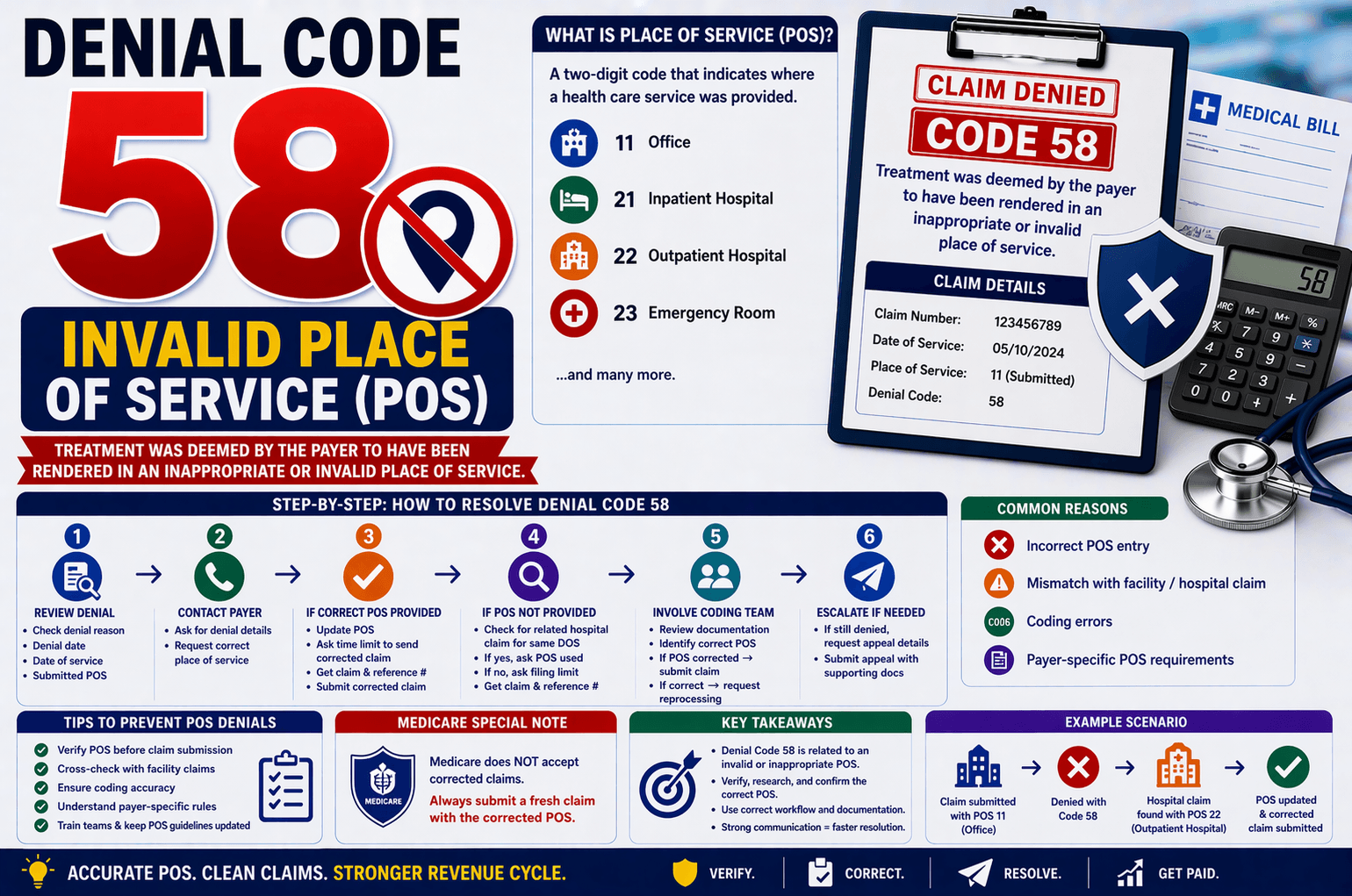
In medical billing, claim denials are a routine challenge—but understanding the root cause is what separates efficient revenue cycle teams from struggling ones. One such denial is Denial Code 58, which indicates that a claim was submitted with an invalid or inappropriate Place of Service (POS).
This article breaks down Denial Code 58 in simple terms, explains why it happens, and provides a step-by-step workflow to resolve it effectively. Whether you’re a beginner in medical billing or looking to refine your denial management process, this guide will help you handle POS-related denials with confidence.
What is Denial Code 58?
Denial Code 58 means:
“Treatment was deemed by the payer to have been rendered in an inappropriate or invalid place of service.”
What is Place of Service (POS)?
The Place of Service (POS) is a two-digit code used in medical claims to specify where the healthcare service was provided. For example:
11 – Office
21 – Inpatient Hospital
22 – Outpatient Hospital
23 – Emergency Room
If the POS submitted does not match the payer’s expectations or records, the claim gets denied.
Why Does Denial Code 58 Occur?
Understanding the cause is key to fixing the issue quickly. Common reasons include:
- Incorrect POS Entry
The provider or billing team may have entered the wrong POS code during claim submission. - Mismatch with Facility Claims
If a hospital or facility claim exists for the same Date of Service (DOS), the POS must align with that claim. - Coding Errors
Incorrect interpretation of where the service was performed can lead to POS errors. - Payer-Specific Rules
Different insurance companies may have unique POS requirements.
Step-by-Step Workflow to Resolve Denial Code 58
Here’s a structured and professional approach to handle this denial:
Step 1: Review the Denial
Start by verifying:
Denial reason (Code 58)
Date of denial
Date of service (DOS)
Submitted POS
Step 2: Contact the Insurance Representative
When calling the payer, follow this workflow:
Ask for Denial Details
“May I get the denial date?”
Request Correct POS
“Could you please provide the correct place of service?”
Step 3: If the Representative Provides the Correct POS
Proceed with the following:
Update the POS in your system
Ask:
“What is the time limit to send a corrected claim?”
“May I have the claim number and call reference number?”
Submit a corrected claim (or fresh claim if required)
Step 4: If the Representative Refuses to Provide POS
Don’t stop there—dig deeper:
Check for Related Hospital Claims
Ask:
“Is there any paid hospital claim associated with the same DOS?”
If NO:
Ask for the timely filing limit
Collect claim and reference numbers
If YES:
Ask:
“What is the POS used in the hospital claim?”
Use this POS as a reference for correction
Step 5: Involve the Coding Team
If the payer does not provide the correct POS:
Assign the claim to the coding team
Request them to:
Review documentation
Identify the correct POS
After Coding Review:
If POS is corrected → Submit corrected claim
If coding is correct → Call payer and request reprocessing
Step 6: Escalate if Needed
If the payer still denies:
Request appeal details
Submit a formal appeal with:
Supporting documentation
Coding justification
Special Note: Medicare Claims
Medicare has a unique rule:
Does NOT accept corrected claims
Always submit a fresh claim with the corrected POS
Failing to follow this can result in repeated denials.
Key Tips to Prevent Denial Code 58
Prevention is always better than rework. Here are some best practices:
Verify POS Before Submission
Double-check POS against:
Provider notes
Facility records
Cross-Check with Facility Claims
Ensure alignment with any hospital or outpatient claims for the same DOS.
Train Billing and Coding Teams
Regular training reduces errors in POS selection.
Maintain Updated POS Guidelines
Keep a reference list of POS codes and payer-specific rules.
Document Everything
Always record:
Call reference numbers
Representative names
Dates of communication
Example Scenario
Let’s simplify with an example:
A provider submits a claim with POS 11 (Office)
The payer denies with Code 58
On calling, you discover:
A hospital outpatient claim exists
Correct POS should be 22 (Outpatient Hospital)
Resolution:
Update POS to 22
Submit corrected claim
Track for payment
FAQs
- What does POS mean in medical billing?
POS (Place of Service) indicates where a healthcare service was performed using a standardized two-digit code. - Can I always send a corrected claim for Denial Code 58?
Yes, except for Medicare. Medicare requires a fresh claim, not a corrected one. - What if the insurance representative refuses to give the correct POS?
You should:
Check for related hospital claims
Involve the coding team for review - How do I know the correct POS?
The correct POS depends on:
Clinical documentation
Location of service
Facility involvement - What happens if I ignore POS errors?
Ignoring POS errors can lead to:
Repeated denials
Revenue loss
Delayed payments
Conclusion:
Denial Code 58 may seem straightforward, but resolving it requires a structured approach, attention to detail, and coordination between billing, coding, and payer communication.
By understanding the importance of the Place of Service, verifying claims before submission, and following a clear workflow during denial handling, you can significantly reduce rework and improve reimbursement timelines.
A proactive approach—combined with accurate documentation and strong payer communication—ensures that POS-related denials don’t disrupt your revenue cycle.