In medical billing, claim denials are a common challenge—and one of the most frequent issues is the denial stating: “Procedure modifier was invalid on the date of service.”
For beginners and even experienced professionals, this can be confusing. Why was the modifier invalid? Was it used incorrectly? Or does it require correction and resubmission?
This article breaks down the entire scenario in simple, practical terms. You’ll learn what this denial means, how to handle it step by step, and the best practices to avoid it in the future.
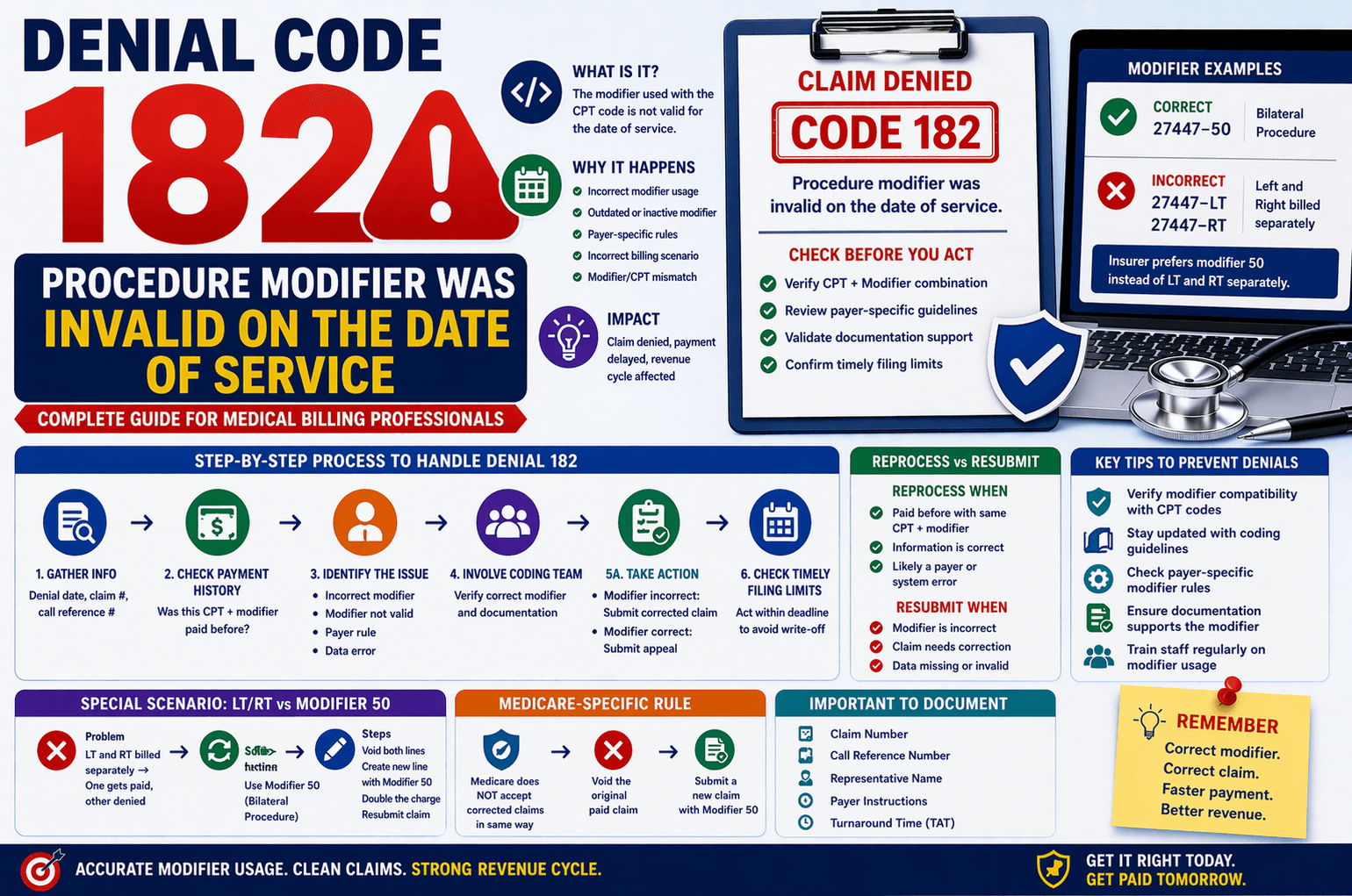
What Does “Invalid Procedure Modifier” Mean?
A procedure modifier is a two-character code added to a CPT (Current Procedural Terminology) code. It provides extra information about the service performed.
When a claim is denied for an invalid modifier, it usually means:
The modifier does not match the procedure code
The modifier is not valid for the date of service
The payer does not recognize the modifier
The modifier combination is incorrect
Common Reasons for This Denial
Understanding the root cause helps resolve the issue faster.
- Incorrect Modifier Usage
Some modifiers can only be used with specific CPT codes. Using the wrong combination triggers denial. - Outdated or Inactive Modifier
Modifiers may become invalid due to updates in coding guidelines. - Payer-Specific Rules
Insurance companies may have unique rules about which modifiers they accept. - Incorrect Billing Scenario
For example:
Using LT (Left) and RT (Right) separately when a bilateral modifier (50) is required
Step-by-Step Process to Handle This Denial
When you encounter this denial, follow a structured workflow.
Step 1: Gather Basic Information
Start by asking or checking:
What is the denial date?
What is the claim number?
What is the call reference number?
This information is critical for tracking and follow-ups.
Step 2: Check Payment History
Verify if the same CPT code with the same modifier was previously paid.
Scenario A: Payment Exists
If the same CPT + modifier combination was already paid:
Request the payer to reprocess the claim
Ask:
What is the Turnaround Time (TAT)?
Can the claim be reopened?
This indicates the denial may be a processing error.
Scenario B: No Previous Payment
If no payment exists:
Check the timely filing limit for corrected claims
Gather:
Fax number or mailing address for appeal
Time limit to submit appeal
Role of the Coding Team
This denial must be reviewed by the coding team.
Why?
Because only certified coders can determine:
Whether the modifier is actually incorrect
What the correct modifier should be
Possible Outcomes:
- Modifier is Incorrect
Update with correct modifier
Submit a corrected claim - Modifier is Correct
File an appeal with supporting documentation
Handling Timely Filing Limits
Timely filing is critical in medical billing.
For Corrected Claims:
If within time limit → Submit corrected claim
If crossed → Follow client instructions (some still allow submission)
For Appeals:
Calculate time from denial date
If within limit → Send appeal
If exceeded → Usually write off (unless client requests otherwise)
Special Scenario: LT/RT vs Modifier 50
A very common situation involves bilateral procedures.
Problem:
CPT billed with LT (Left) and RT (Right) separately
One gets paid, the other denied
Solution:
Insurance expects Modifier 50 (Bilateral Procedure)
Steps to Fix:
Void both original CPT lines
Create a new line with modifier 50
Double the charge amount
Submit corrected claim
Medicare-Specific Rule
Medicare has stricter guidelines.
Important:
Medicare does NOT accept corrected claims in the usual way
Correct Process:
Submit a void claim for the paid CPT
Submit a new claim with modifier 50
Failing to follow this can lead to repeated denials.
Key Tips to Avoid Modifier Denials
Here are practical tips to minimize these errors:
Always verify modifier compatibility with CPT codes
Stay updated with coding guideline changes
Check payer-specific modifier rules
Use billing software edits to catch errors early
Ensure documentation supports the modifier used
Train staff regularly on modifier usage
Example Scenario
Let’s simplify with an example:
CPT Code: 27447 (Knee procedure)
Modifier used: RT and LT separately
Outcome:
RT paid
LT denied as invalid modifier
Fix:
Replace both with Modifier 50
Combine into a single line
Adjust billing amount
Resubmit claim
Frequently Asked Questions (FAQs)
- What is the most common reason for modifier denial?
The most common reason is using a modifier that does not match the CPT code or payer guidelines. - Can I resubmit a corrected claim after the time limit?
Usually no, but some clients or payers may still allow it. Always confirm before proceeding. - When should I send an appeal instead of a corrected claim?
Send an appeal when the modifier used is correct and supported by documentation. - Why is modifier 50 preferred over LT and RT?
Modifier 50 indicates a bilateral procedure in a single line, which many insurers require for proper processing. - Does Medicare accept corrected claims?
No, Medicare typically requires voiding the original claim and submitting a new one instead.
Conclusion:
The denial “Procedure modifier was invalid on the date of service” may seem complex, but it follows a logical resolution path.
The key is to:
Verify payment history
Involve the coding team
Follow payer-specific rules
Act within timely filing limits
By understanding modifier usage and applying structured workflows, you can significantly reduce denials and improve claim success rates.
Mastering this process not only improves efficiency but also strengthens your overall medical billing expertise.