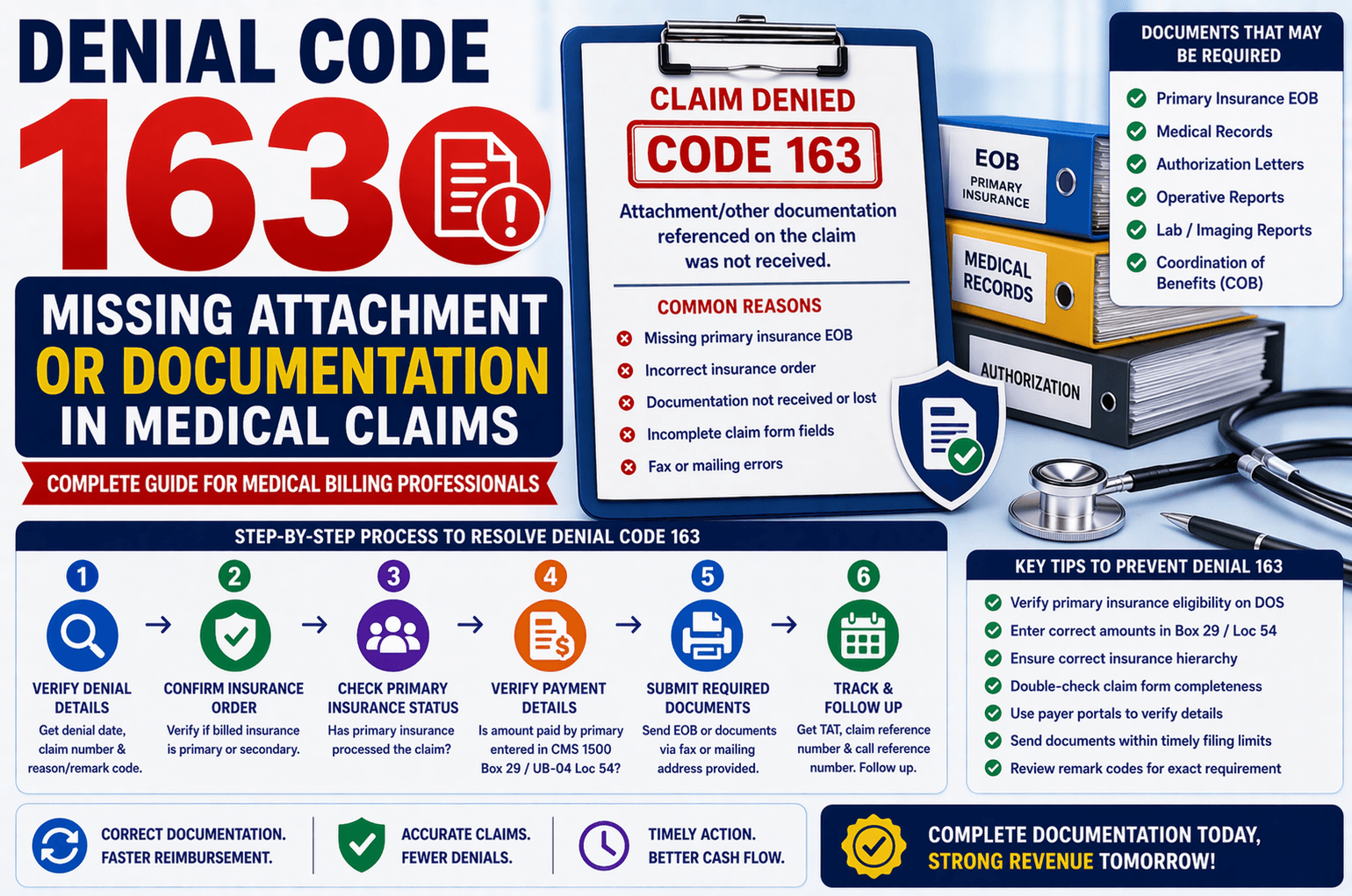
In medical billing and revenue cycle management, claim denials are a common challenge. One such denial—Denial Code 163—occurs when required documentation or attachments are not received by the payer. This issue can delay reimbursements and increase administrative workload if not handled correctly.
This article explains Denial Code 163 in simple terms, outlines how to resolve it efficiently, and provides actionable tips to prevent it in the future. Whether you’re a beginner in medical billing or looking to refine your denial management skills, this guide will help you navigate this scenario with clarity.
What is Denial Code 163?
Denial Code 163 typically means:
“Attachment/other documentation referenced on the claim was not received.”
In simpler terms, the insurance company is saying:
You mentioned supporting documents (like EOBs, medical records, or reports)
But they did not receive them
This often happens in coordination of benefits (COB) scenarios—especially when primary insurance details or EOBs are missing.
Common Reasons for Denial Code 163
Understanding the root cause is critical. Here are the most common reasons:
- Missing Primary Insurance EOB
The claim was billed to secondary insurance
But the Explanation of Benefits (EOB) from the primary payer was not submitted - Incorrect Insurance Order
The insurance billed is listed as primary, but it is actually secondary - Documentation Not Sent or Lost
Attachments were never sent
Or they were sent but not received due to:
Fax issues
Incorrect mailing address
System errors - Incomplete Claim Form
Required fields like:
CMS-1500 Box 29 (amount paid by primary)
UB-04 Locator 54
were left blank or incorrect
Step-by-Step Process to Resolve Denial Code 163
Handling this denial requires a structured approach. Below is a simplified workflow based on real-world call scenarios.
Step 1: Verify the Denial Details
Start by asking:
What is the denial date?
What is the exact denial reason and remark code?
This ensures you’re working on the correct issue.
Step 2: Confirm Insurance Order
Check your system:
Is the billed insurance primary or secondary?
If It’s Primary:
Ask the representative:
Which insurance is primary?
Get details like:
Policy ID
Payer ID
Mailing address
If the rep does not provide details:
Check internal systems or patient history
Verify via payer portals if available
Step 3: Verify Primary Insurance Payment Status
If the claim involves secondary insurance, confirm:
Has the primary insurance processed the claim?
If YES:
Check:
Is the paid amount entered in CMS-1500 Box 29?
If Box 29 is filled:
Request reprocessing:
“Primary payment details are already included in the claim.”
If Box 29 is NOT filled:
Send the EOB via:
Fax
Mailing address provided by payer
If NO:
Follow up with the primary insurance
Work the claim as per their status
Step 4: Submit Required Documentation
If documentation is missing:
Ask:
What is the fax number or mailing address?
What is the timely filing limit?
Then:
Send the required EOB or documents
Include:
Claim number
Patient details
Correct references
Step 5: Track and Follow Up
After submission:
Ask for TAT (Turnaround Time)
Request:
Claim reference number
Call reference number
Follow up within the given timeframe.
Important Tips for Efficient Handling
✔ Always Verify Eligibility
Check if the primary insurance is active on the date of service (DOS)
If inactive:
Request reprocessing or correct billing
✔ Update Insurance Order Correctly
If new primary insurance is identified:
Update system
Rebill correctly
✔ Check Claim Form Fields
Ensure:
CMS-1500 Box 29 is filled
UB-04 Locator 54 is accurate
✔ Use Payer Portals
Many portals provide:
Insurance hierarchy
Claim status
EOB access
✔ Monitor Timely Filing Limits
If the deadline has passed:
Follow client instructions
Or process write-off if applicable
✔ Review Remark Codes Carefully
Sometimes denial 163 includes additional codes
These can reveal the exact missing document
Example Scenario
Let’s simplify with a real-world example:
A claim is sent to secondary insurance
It gets denied with Code 163
You check and find:
Primary insurance already paid
But Box 29 is empty
Resolution:
Update Box 29 with the paid amount
Resubmit the claim
If still denied:
Send EOB via fax
FAQs
- What does Denial Code 163 mean?
It means the insurance company did not receive required documents or attachments referenced in the claim. - What documents are usually missing?
Commonly:
Primary insurance EOB
Medical records
Authorization documents - Where should I enter primary payment details?
In:
CMS-1500 Form: Box 29
UB-04 Form: Locator 54 - What if the payer says they didn’t receive the EOB?
Ask for:
Fax number or mailing address
Then resend the EOB and document the submission. - What if I don’t know the primary insurance?
Check internal systems
Review patient history
Use payer portals
Verify eligibility
Conclusion:
Denial Code 163 may seem straightforward, but it often involves deeper issues like incorrect insurance hierarchy or missing EOB details. The key to resolving it efficiently lies in:
Verifying insurance order
Ensuring proper documentation submission
Using claim forms correctly
Following up diligently
By adopting a structured approach and paying attention to detail, you can significantly reduce rework and improve claim success rates.
Consistent documentation, proactive verification, and timely follow-ups are your strongest tools in preventing this denial in the future.