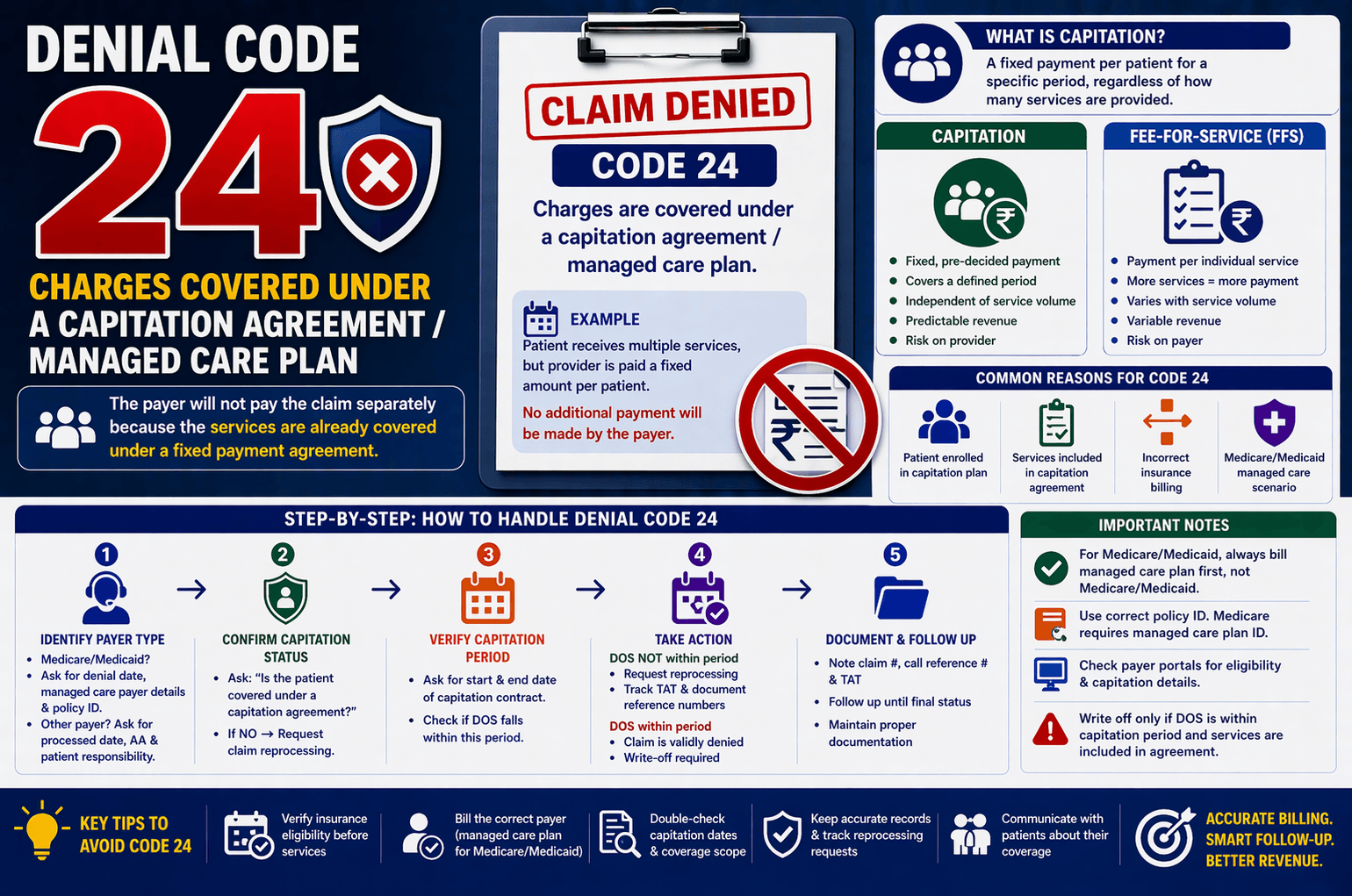
In medical billing and revenue cycle management, denial codes can often create confusion—especially for beginners. One such common denial is Denial Code 24, which states: “Charges are covered under a capitation agreement/managed care plan.”
If not handled correctly, this denial can lead to delayed payments or unnecessary write-offs. This article breaks down Denial Code 24 in simple terms, explains why it occurs, and outlines clear steps to resolve it efficiently.
What Is Capitation in Healthcare?
Capitation is a payment arrangement between a healthcare provider and an insurance payer.
Simple Definition:
Under a capitation agreement, the provider receives a fixed payment per patient for a specific period—regardless of how many services the patient receives.
Example:
A clinic gets ₹1,000 per patient per month
Whether the patient visits once or ten times, the payment remains the same
Key Features:
Fixed, pre-decided payment
Covers a defined period (monthly, yearly)
Independent of service volume
What Is Fee-for-Service (FFS)?
To understand capitation better, compare it with Fee-for-Service (FFS).
Fee-for-Service Model:
Provider is paid for each individual service
More services = more reimbursement
Example:
Consultation: ₹500
Lab test: ₹1,000
Total paid = ₹1,500
Key Difference:
Capitation Fee-for-Service
Fixed payment Payment per service
Predictable revenue Variable revenue
Risk on provider Risk on payer
What Does Denial Code 24 Mean?
Denial Code 24 occurs when:
The insurance payer indicates that the charges are already covered under a capitation agreement, so they will not pay the claim separately.
In Simple Terms:
The provider has already been paid (or will be paid) under a contract—so billing again is not allowed.
Common Reasons for Denial Code 24
Understanding the root cause is essential for resolution.
- Patient Enrolled in a Capitation Plan
The patient is assigned to a provider under a managed care contract. - Services Included in Capitation Agreement
The billed services fall under the scope of the capitation payment. - Incorrect Insurance Billing
Claim submitted to the wrong payer instead of the managed care organization. - Medicare/Medicaid Managed Care Scenario
When Medicare or Medicaid denies with Code 24, it often means:
The claim should be billed to a managed care plan, not directly to Medicare/Medicaid.
Step-by-Step Action Plan (Call Handling Scenario)
Handling Denial Code 24 requires structured follow-up. Here’s a simplified workflow:
Step 1: Identify the Payer Type
If Medicare/Medicaid:
Ask for:
Denial date
Managed care payer details
Confirm:
Policy ID
Claim mailing address
👉 Action:
Update managed care insurance as primary and rebill the claim.
If Other Payers:
Ask the following:
Processed/paid date
Adjustment Amount (AA)
Patient Responsibility (copay, deductible, coinsurance)
Step 2: Confirm Capitation Status
Ask:
“Is the patient covered under a capitation agreement?”
If NO:
Request claim reprocessing
Ask for TAT (Turnaround Time)
Note claim reference details
If YES:
Proceed to next step
Step 3: Verify Capitation Period
Ask:
Start date of capitation contract
End date of contract
Then check:
Does the Date of Service (DOS) fall within this period?
Step 4: Take Appropriate Action
Case 1: DOS NOT within capitation period
Request reprocessing
Track TAT
Document reference numbers
Case 2: DOS within capitation period
Claim is validly denied
Write-off required
Important Billing Tips
To avoid repeated denials, follow these best practices:
Always Verify Insurance Eligibility
Confirm if patient is under managed care or capitation before billing
Bill Correct Payer
For Medicare/Medicaid:
Bill managed care plan first
Do NOT bill Medicare/Medicaid as secondary in these cases
Use Correct Policy ID
Medicaid: Often same ID (except some payers like BCBS)
Medicare: Requires separate managed care policy ID
Check Payer Portals
Many managed care details are available online
Track Reprocessing Requests
Always note:
Claim number
Call reference number
TAT
When Should You Write Off the Claim?
Write-off is necessary when:
Patient is confirmed under capitation agreement
Date of Service falls within contract period
Services are included in capitation coverage
👉 Reason:
The provider is already compensated through the capitation payment.
Key Takeaways
Denial Code 24 indicates no additional payment due under capitation
Always verify patient coverage and contract period
Medicare/Medicaid denials often require rebilling to managed care
Incorrect billing is a major cause of this denial
Proper documentation and follow-up are essential
FAQs
- What is Denial Code 24 in simple terms?
It means the insurance payer will not pay because the services are already covered under a fixed payment agreement (capitation). - Can I appeal Denial Code 24?
Yes—but only if:
The patient is NOT under capitation
OR the service date is outside the contract period
Otherwise, appeal will be unsuccessful. - Should Medicare be billed as secondary after capitation denial?
No. Medicare/Medicaid will continue denying the claim. You must bill the managed care plan instead. - How do I find managed care details?
Call the payer
Check payer portals
Review patient eligibility records - What is the biggest mistake leading to Denial Code 24?
Billing the wrong payer without verifying if the patient is under a managed care or capitation plan.
Conclusion:
Denial Code 24 may seem complex at first, but it becomes manageable once you understand capitation agreements. The key is identifying whether the patient falls under such a plan and whether the service date aligns with the contract period.
Accurate insurance verification, correct payer billing, and structured follow-up can significantly reduce these denials. With the right approach, you can prevent revenue loss and maintain a smooth billing workflow.
If you’re working in medical billing, mastering denials like Code 24 is essential for improving claim acceptance rates and overall efficiency.