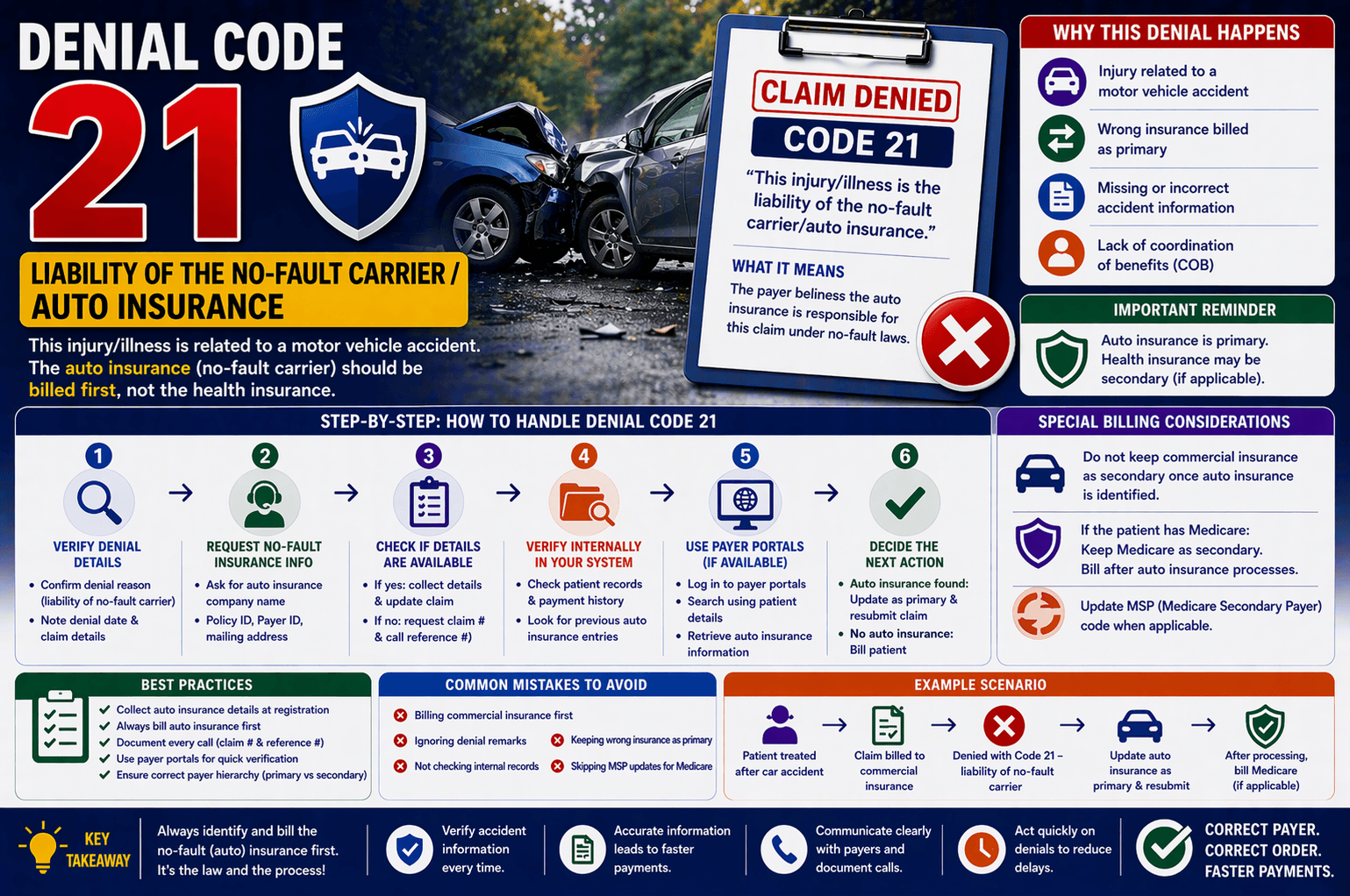
In medical billing, claim denials are a common challenge—but some can be particularly confusing, especially for beginners. One such denial reads: “This injury/illness is the liability of the no-fault carrier/auto insurance.”
If you’ve encountered this message, it means the insurance company is indicating that the treatment is related to an auto accident, and therefore, the auto insurance (no-fault carrier) should be billed instead of the commercial or primary health insurance.
Understanding how to handle this situation properly is essential for reducing delays, preventing revenue loss, and ensuring accurate claim processing. This guide breaks down everything you need to know in a simple, practical way.
What Is a No-Fault Insurance Denial?
A no-fault insurance denial occurs when a health insurance payer refuses a claim because the injury is related to a motor vehicle accident. In such cases:
Auto insurance becomes the primary payer
Health insurance may act as secondary payer (if applicable)
The provider must bill the no-fault carrier first
This type of denial is not a rejection of services—it’s simply a redirection to the correct payer.
Why Do These Denials Happen?
These denials typically occur due to:
Missing or incorrect accident information
Failure to list auto insurance as primary payer
Lack of coordination of benefits (COB)
Incomplete patient insurance details
Incorrect billing sequence
Step-by-Step Process to Handle No-Fault Denials
Let’s walk through the correct workflow to resolve this denial efficiently.
- Verify the Denial Details
Start by confirming:
Denial reason: “Liability of no-fault carrier”
Date of denial
Claim details
Why this matters: Ensures you’re working on the correct issue and claim. - Request No-Fault Insurance Information
Contact the insurance representative and ask:
Name of the auto insurance company
Policy ID
Payer ID
Mailing address
If the representative has the details, proceed to update the claim. - Check If Details Are Available
If YES:
Collect all required insurance information
Update system with auto insurance as primary
Resubmit the claim to the no-fault carrier
If NO:
Ask for:
Claim number
Call reference number
Then proceed to internal verification. - Verify Internally in Your System
If the representative cannot provide details:
Check patient records for:
Previous auto insurance entries
Payment history
Look for any indication that auto insurance was previously billed - Use Payer Portals
If access is available:
Log into payer portals
Search using patient details
Retrieve auto insurance information
This can often save time and reduce back-and-forth calls. - Decide the Next Action
Based on findings:
Scenario A: Auto Insurance Found
Update it as primary payer
Resubmit the claim
Scenario B: No Auto Insurance Found
Release the claim to patient responsibility
Special Billing Considerations
- Do Not Keep Commercial Insurance as Secondary
Once auto insurance is identified:
It must be billed as primary
Commercial insurance should not remain secondary unless appropriate coordination exists - Medicare as Secondary Payer
If the patient has Medicare:
Keep Medicare as secondary
After auto insurance processes the claim:
If balance remains → bill Medicare
Update MSP (Medicare Secondary Payer) code
Example Scenario
Let’s simplify with an example:
Situation:
A patient visits a clinic after a car accident. The claim is mistakenly billed to commercial insurance.
Outcome:
Commercial payer denies with “liability of no-fault carrier.”
Resolution:
Contact payer → request auto insurance details
Update system → auto insurance as primary
Resubmit claim
After processing → bill Medicare (if applicable)
Key Tips for Handling No-Fault Denials
Always verify accident-related cases during patient registration
Collect auto insurance details upfront
Document every call (claim # and reference #)
Use payer portals whenever possible
Ensure correct payer hierarchy (primary vs secondary)
Avoid unnecessary delays by acting immediately on denials
Common Mistakes to Avoid
Billing commercial insurance first
Ignoring denial remarks
Not checking internal records
Keeping wrong insurance as primary
Skipping MSP updates for Medicare
Frequently Asked Questions (FAQs)
- What does “no-fault carrier” mean in medical billing?
It refers to auto insurance that covers medical expenses regardless of who caused the accident. - Can I bill health insurance before auto insurance?
No. Auto insurance must always be billed first if the injury is accident-related. - What if no auto insurance information is available?
You should:
Check internal systems
Review patient history
If still unavailable → bill the patient - Is Medicare always secondary in these cases?
Yes, if auto insurance exists. Medicare becomes secondary and is billed after the primary payer processes the claim. - Why is my claim denied even though I submitted it correctly?
Possible reasons include:
Missing accident indicator
Incorrect payer sequence
Lack of coordination of benefits
Conclusion
Handling no-fault insurance denials may seem complex at first, but once you understand the workflow, it becomes manageable. The key is to identify the correct payer, gather accurate information, and follow proper billing hierarchy.
By verifying denial details, collecting auto insurance data, and updating claims correctly, you can significantly reduce delays and improve claim success rates.
For beginners in medical billing, mastering this process is an essential step toward becoming efficient and error-free in claims management.