Denial Code 182: Procedure Modifier Was Invalid on the Date of Service (Simple Guide)
In medical billing, one of the most common claim rejections is related to incorrect or invalid modifiers. A frequently seen denial is:
✅ Denial Code 182 – Procedure modifier was invalid on the date of service
This denial means the modifier billed along with the CPT code was either:
• Not valid for that specific Date of Service (DOS)
• Not applicable to that procedure
• Should have been billed differently (example: bilateral services)
Let’s understand how to handle this denial step-by-step.
What Does Denial Code 182 Mean?
Denial 182 occurs when the insurance payer rejects the claim because the modifier used is invalid.
For example:
• Wrong modifier billed
• Modifier expired or not allowed on that DOS
• Incorrect usage of LT/RT instead of 50
• Billing format issues for bilateral procedures
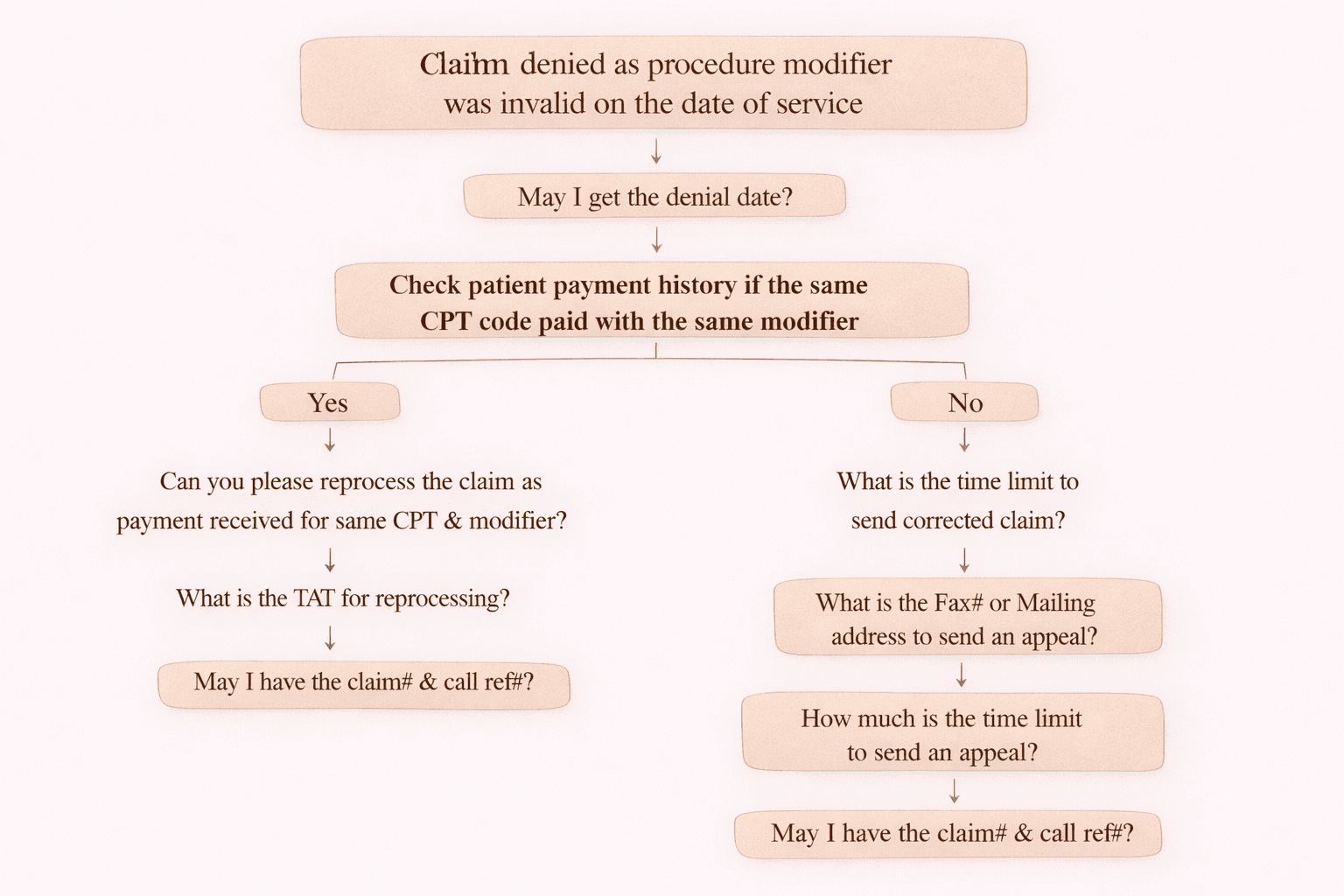
On-Call Handling Flow for Denial 182
When a claim is denied for invalid modifier, follow the below call flow and documentation steps.
Step 1: Ask for Denial Date
First confirm:
✅ “May I get the denial date?”
Because all further action (corrected claim or appeal) depends on the denial date.
Step 2: Check Payment History
Now verify if the same CPT + same modifier was previously paid for the patient.
Check internally:
✅ Was the same CPT code paid with the same modifier earlier?
There are two possible results.
If YES: Same CPT + Modifier Paid Previously
That means the payer accepted the modifier earlier.
Next questions to ask:
- ✅ “Can you please reprocess the claim as payment was received for the same CPT & modifier?”
- ✅ “What is the TAT for reprocessing?”
- ✅ “May I have the claim number and call reference number?”
📌 This is the correct action because the payer already accepted that CPT + modifier combination previously.
If NO: Same CPT + Modifier Not Paid Previously
That means the modifier is likely incorrect or payer rules may have changed.
Next questions to ask:
- ✅ “What is the time limit to send a corrected claim?”
- ✅ “What is the fax number or mailing address to send an appeal?”
- ✅ “How much is the time limit to send an appeal?”
- ✅ “May I have the claim number and call reference number?”
📌 The correct next step depends on whether the coding team confirms the modifier.
Important Back-End Actions (Coding + Billing)
1) Send to Coding Team
This denial must always be assigned to the coding team to verify the modifier and provide the correct modifier if needed.
Coding Team Results
Case A: Coding Team Provides a Correct Modifier
✅ Update the modifier based on coding feedback
✅ Submit a corrected claim
📌 Even if the corrected claim time limit is crossed, sometimes the client may still request submission. Always follow client instructions.
Case B: Coding Team Confirms Modifier Is Correct
Then the correct action is to file an appeal.
✅ Send appeal to the insurance payer.
Corrected Claim vs Appeal: Time Limit Rules
Corrected Claim Timely Filing
• Always ask payer for the corrected claim time limit
• If within limit → submit corrected claim
• If limit crossed → usually write off unless the client instructs otherwise
Appeal Timely Filing
Always calculate the appeal deadline from the denial date.
✅ If appeal time limit is not crossed → send appeal
❌ If appeal limit crossed → write off (unless client asks to submit anyway)
Special Scenario: LT/RT vs Bilateral (Modifier 50)
Sometimes the payer pays one line and denies the other.
Example:
• CPT billed with LT → Paid
• CPT billed with RT → Denied as invalid modifier
In such cases, the payer expects:
✅ CPT in ONE LINE using Modifier 50 (Bilateral)
Correct Action
- Void both lines (LT and RT)
- Create a new single line with modifier 50
- Double the charge amount
- Submit corrected claim
Medicare Rule (Important)
🚨 Medicare usually does not accept corrected claims in the typical corrected claim format.
So process Medicare like this:
✅ Step 1: Send a void claim for the paid CPT
✅ Step 2: Submit a new claim with modifier 50
Quick Checklist for Denial Code 182
Before completing the denial work, confirm:
✅ Denial date
✅ Check history for same CPT + modifier payment
✅ If paid earlier → request reprocessing
✅ If not paid → check corrected claim and appeal limits
✅ Send claim to coding team for modifier validation
✅ Submit corrected claim if modifier change needed
✅ Submit appeal if modifier is correct
✅ Use modifier 50 for bilateral scenarios
✅ For Medicare → void claim + submit new claim
Conclusion
Denial Code 182 is manageable when handled with a structured workflow.
Key steps include:
• Verifying denial date
• Checking payment history
• Involving the coding team
• Working within timely filing limits
Following these steps helps reduce rejections and improve claim resolution.