Denial Code 236 Explained: Procedure Combination Not Compatible (NCCI / Workers Comp)
In medical billing, Denial Code 236 is a very common denial seen in claims processing—especially for Workers Compensation and Medicare.
If your claim is denied with Code 236, it means:
One procedure code was billed, but
it is not compatible with another procedure code billed on the same date of service (DOS) as per:
• National Correct Coding Initiative (NCCI) edits
• Workers Compensation state regulations / fee schedule rules
Let’s understand what this denial means and how to handle it in a simple way.
What Does Denial Code 236 Mean?
Denial 236 = Procedure code combination is not allowed on the same day.
This happens when two CPT codes are billed together and:
• one CPT is considered bundled into another
• both CPTs are mutually exclusive
• the payer allows it only with a proper modifier
Example:
You billed two CPTs on the same day.
Insurance says:
“These CPTs cannot be paid together. One is bundled into another.”
Why Does This Denial Happen?
Denial 236 usually happens due to:
1) NCCI Bundling
NCCI edits say:
• one CPT is included in another CPT
• both cannot be paid separately unless modifier is allowed
2) Missing Modifier
Sometimes, the payer allows both codes only if a correct modifier is added such as:
• Modifier 59
• Modifier XE
• Modifier XU
• Modifier 51
3) Workers Compensation State Rules
Workers compensation payers follow state fee schedule and special bundling rules.
On-Call Scenario Script (Denial 236)
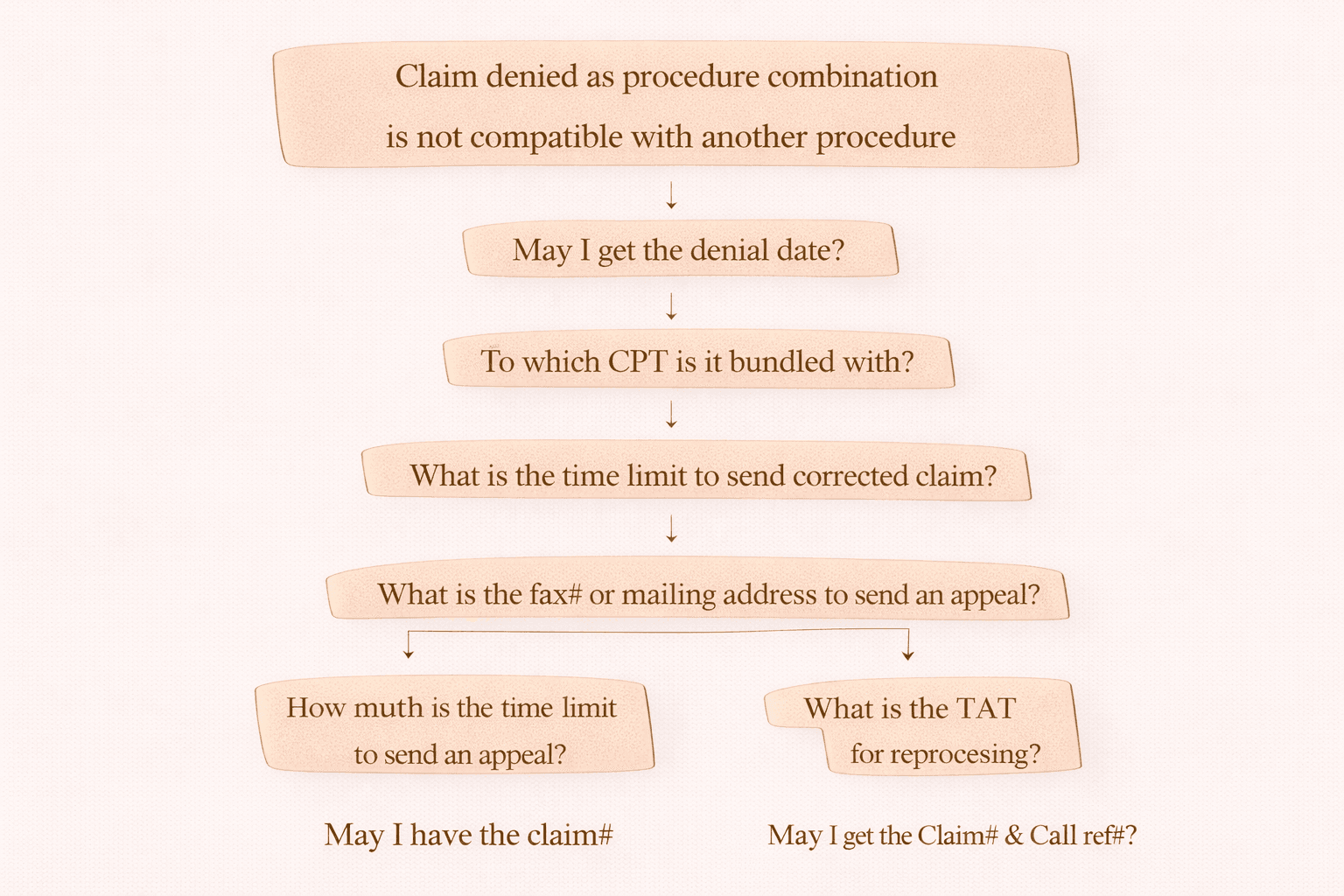
When you call the insurance/payer for a Denial 236, follow this step-by-step flow:
Step 1: Confirm Denial Reason
“Claim denied as procedure combination is not compatible with another procedure.”
Step 2: Ask for Denial Date
“May I get the denial date?”
Step 3: Identify the Bundled CPT
“To which CPT is it bundled with?”
This is important because you must know:
• which code is denied
• which code was paid
• which one is the primary procedure
Step 4: Ask Corrected Claim Filing Limit
“What is the time limit to send corrected claim?”
Step 5: Appeal Submission Info
“What is the fax number or mailing address to send an appeal?”
Step 6: Collect Reference Details
“May I have the claim number and call reference number?”
Important Note (Very Important for Billing Teams)
Once you receive Denial 236:
Send the claim details to the coding team immediately.
Reason:
Coding team must check:
• Is there an NCCI edit between CPTs?
• Can the edit be overridden using modifier?
• If yes, which modifier should be used?
Tools to Identify Bundled CPT Codes
To check bundling / NCCI edits between CPT codes, you can use tools like:
• Encoder tools
• Find-A-Code
• Coding software / NCCI lookup tools
These help confirm:
• whether NCCI edit exists
• if modifier override is allowed
• the best modifier suggestion
What to Do After Coding Team Review
After review, there are three possible outcomes:
Case 1: Correct Modifier Found
If the coding team says modifier update is needed:
Update modifier
Submit corrected claim to insurance
Special Note for Medicare:
Medicare does not accept corrected claims
So submit a fresh claim (new claim submission).
Case 2: Coding Is Correct and No NCCI Edit Exists
If:
• coding is correct
• no bundling issue exists
Then call payer and request:
“Please reprocess the claim.”
If payer still denies:
Submit a formal appeal with documentation.
Case 3: CPT Combination Cannot Be Overridden
If NCCI says CPTs are bundled and modifier not allowed:
Claim cannot be corrected
Write off per policy.
Quick Summary (Easy Notes)
Denial 236 = CPT codes not allowed together on same DOS
Find which CPT is bundled with another
Check NCCI edit + modifier possibility
If modifier works → corrected claim
If coding correct → ask payer to reprocess / appeal
If cannot override → write off
Final Tip for AR / Billing Agents
Always document:
• Denial date
• Bundled CPT details
• Filing limit
• Call reference number
• Appeal address/fax
This helps avoid repeated denials and supports faster resolution.