Claim Denied: “This Injury/Illness is Covered by the Liability Carrier” – What to Do Next (Simple Guide)
In medical billing, one common denial you may face is:
“This injury/illness is covered by the liability carrier.”
This denial usually happens when the payer believes the medical services are related to an accident, injury, or incident that should be paid by a liability insurance company (for example: auto insurance, workers comp, slip and fall, etc.), instead of the commercial payer.
In this guide, we’ll explain the denial in a simple way and provide step-by-step action points to resolve it correctly.
What Does This Denial Mean?
When a claim is denied with this message, it means:
• The payer is saying this treatment is related to an accident/injury.
• The payment responsibility should go to a liability insurance carrier.
• The current insurance is not considered primary for this claim.
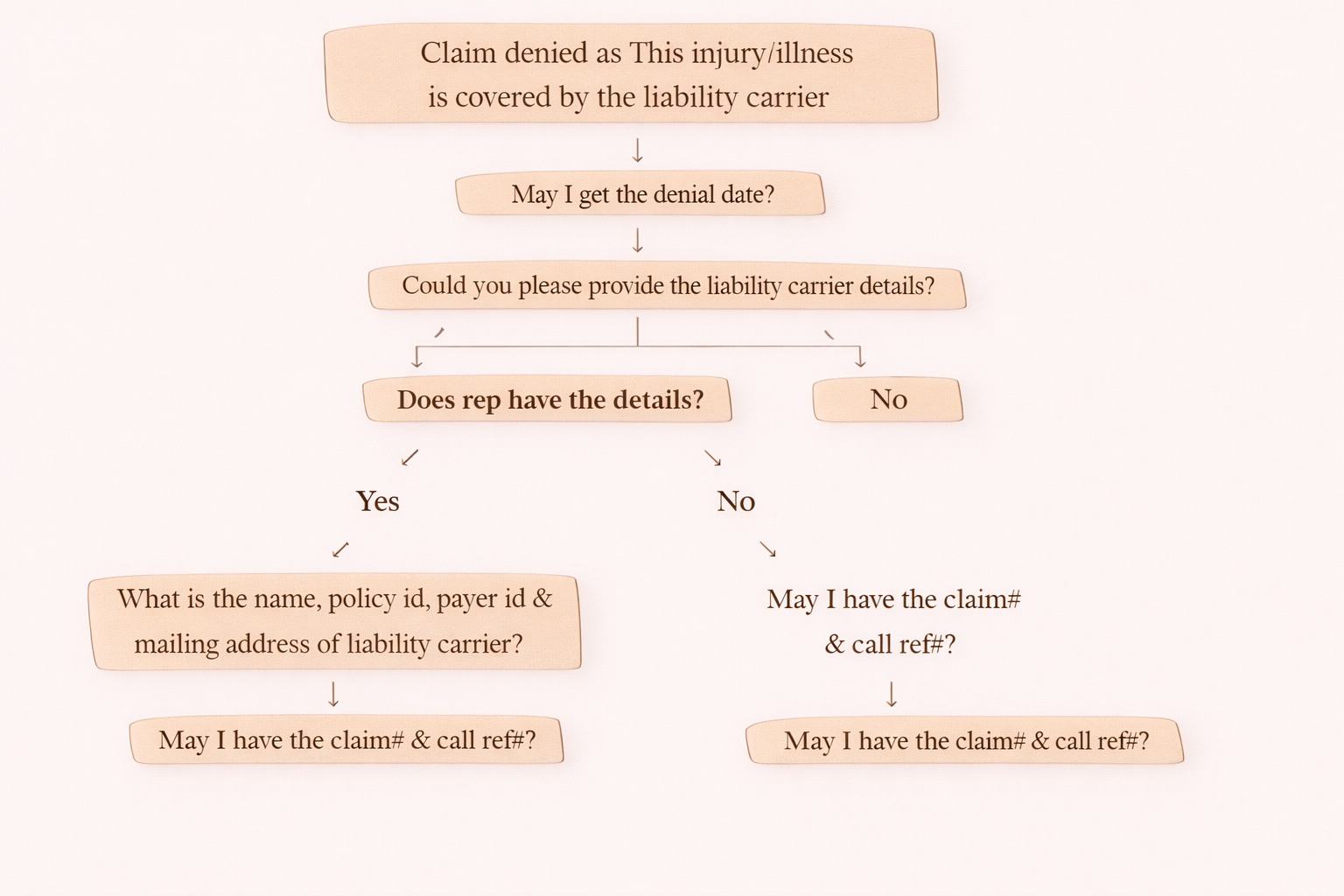
Step-by-Step Call Flow (On-Call Scenario)
When you see this denial, follow these steps on the call:
Step 1: Ask for the Denial Date
Start with:
“May I get the denial date?”
This helps in:
• tracking timelines
• confirming payer’s processing date
• appeal window management (if needed)
Step 2: Ask for Liability Carrier Information
Next ask:
“Could you please provide the liability carrier details?”
Step 3: Check if the Representative Has Liability Carrier Details
Ask:
“Does the rep have the details?”
Now there are two outcomes:
If Rep HAS Liability Carrier Details (Yes)
Then collect the complete liability insurance information:
“What is the name, policy ID, payer ID and mailing address of the liability carrier?”
After that, confirm:
“May I have the claim number and call reference number?”
This is critical for documentation and audit purposes.
If Rep DOES NOT Have Details (No)
Then ask:
“May I have the claim number and call reference number?”
Even if they don’t have the details, you must document the call properly.
Important Note: What to Do If Liability Details Are Not Available
If the payer rep does not provide liability carrier information, you should take internal actions:
1. Check Your Internal System
Look for:
• any liability insurance recorded
• patient insurance history
• patient payment history showing liability payer as primary
If liability payer exists → resubmit claim to that payer
2. Check the Payer Portal (If Access Available)
Sometimes liability insurance details may be found through:
• payer web portal
• eligibility tools
• coordination of benefits (COB) section
3. If No Liability Info Is Available
Then:
Release the claim to the patient
Because without liability carrier information, billing cannot proceed.
Updating the Liability Carrier (If Details Are Received)
If you get full liability insurance details:
Update liability carrier in the system as PRIMARY
Resubmit the claim to the liability payer
Important rule:
Do not keep commercial payer as secondary.
Special Case: Medicare as Secondary
You can keep Medicare as secondary in this scenario.
When the liability insurance processes the claim and leaves the remaining balance as patient responsibility:
bill the remaining balance to Medicare
update the correct MSP code before billing Medicare
This step is mandatory to avoid Medicare rejection.
Quick Summary (Easy Cheat Sheet)
Denial reason: liability carrier should pay
Your actions:
- Ask denial date
- Request liability carrier details
- If details available → collect full info + resubmit
- If details not available → check system & portal
- If still no info → release claim to patient
- Medicare can be secondary (with MSP update)