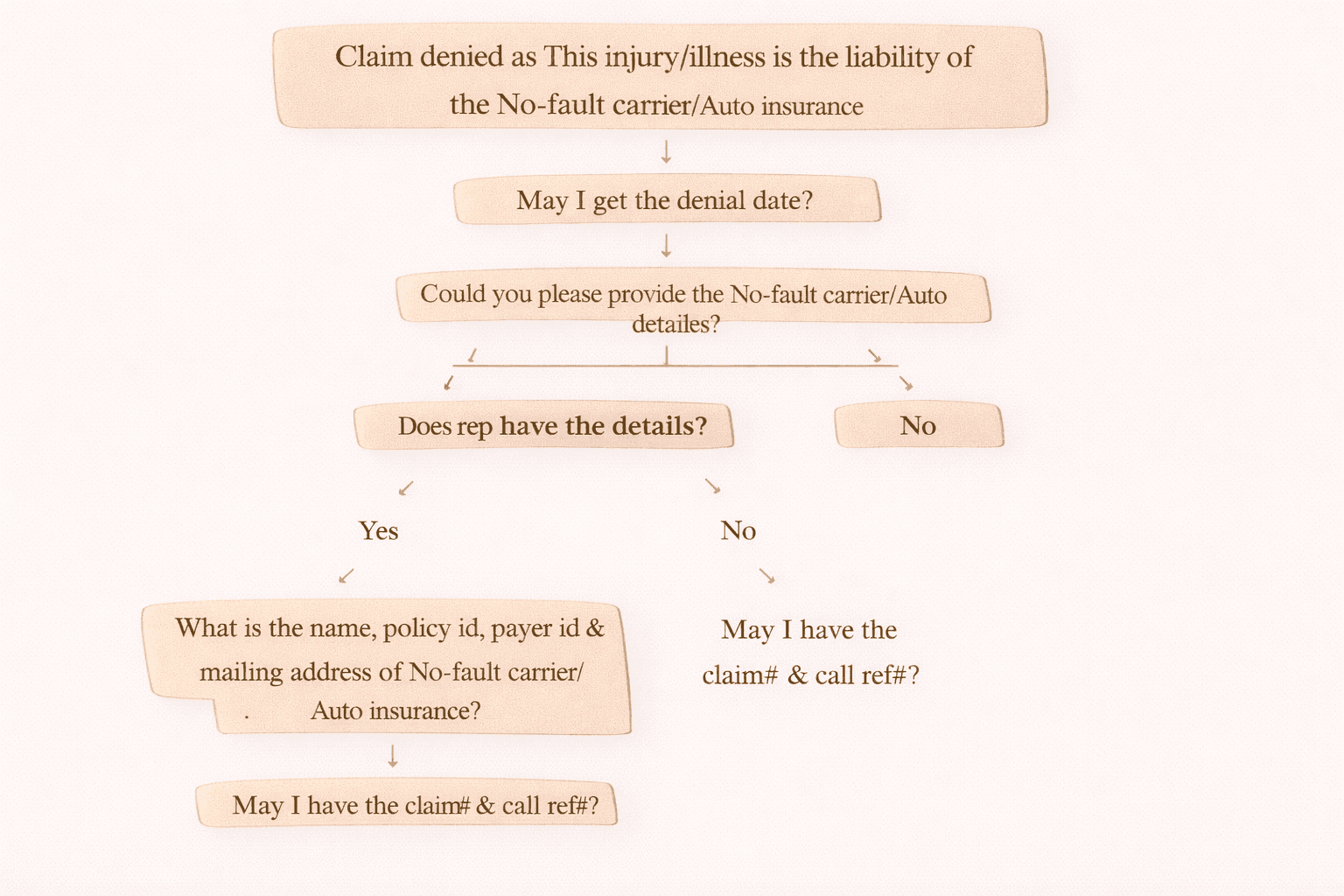
Claim Denied: “This Injury/Illness is the Liability of the No-Fault Carrier” – What to Do?
When working on medical billing and denial management, one common denial is:
“This injury/illness is the liability of the No-Fault carrier / Auto insurance.”
This denial usually means the payer is saying the medical services were related to an auto accident (MVA – Motor Vehicle Accident), and the claim should be billed to the No-Fault/Auto insurance, not the commercial insurance.
In this guide, we will explain the exact call flow and steps to resolve this denial quickly.
What Does This Denial Mean?
If a claim is denied with:
“This injury/illness is the liability of the No-Fault carrier”
It means:
• The patient’s treatment is accident-related
• The primary responsibility is Auto/No-Fault insurance
• The claim must be billed to the correct payer
On-Call Denial Handling Workflow (Step-by-Step)
Step 1: Confirm Denial Date
Start the call politely and professionally:
“May I get the denial date?”
This is important for:
• timely filing tracking
• appeal windows
• next action planning
Step 2: Ask for Auto / No-Fault Insurance Information
“Could you please provide the No-fault carrier / Auto insurance details?”
Does the Representative Have Auto Insurance Details?
Scenario A: YES, Rep Has Details
If rep confirms they have No-Fault carrier info, collect the full details:
Ask:
“What is the name, policy ID, payer ID, and mailing address of the No-Fault carrier/Auto insurance?”
Then request tracking info:
“May I have the claim number and call reference number?”
Scenario B: NO, Rep Does NOT Have Details
If the rep does not have No-Fault insurance details, collect identifiers:
“May I have the claim number & call reference number?”
Then proceed with internal research.
Important Note: What to Do if No-Fault Info is Not Available
If the rep does not provide No-Fault details, then you must do the following checks:
1) Check Internal System
Look for:
• any Auto/No-Fault insurance under patient insurance
• patient’s payment history showing auto payer as primary
If Auto Insurance is found:
resubmit the claim to Auto insurance
If Auto Insurance is NOT found:
release the claim to the patient (patient responsibility due to missing auto insurance)
2) Check Payer Web Portal (If Access Available)
Some payer portals can show:
• accident-related coverage
• claim-level insurance details
This can help you identify the correct No-Fault payer.
What If Rep Provides No-Fault Carrier Details?
If the payer provides full No-Fault insurance details:
Action Steps:
- Update No-Fault/Auto insurance as Primary
- Resubmit the claim to Primary Auto insurance
- Do not keep Commercial payer as secondary
Key Rule:
Do NOT keep commercial insurance as secondary when No-Fault insurance exists.
Medicare Secondary Billing Rule (MSP Update)
If the patient has Medicare:
Medicare can be kept as secondary.
Once the No-Fault/Auto carrier processes the claim and leaves a balance as patient responsibility:
You can bill Medicare after updating the required MSP information:
Update:
• MSP Code
• Accident indicators (if applicable)
• Proper coordination of benefits
Summary: Best Practice Checklist
Here’s a quick checklist to resolve this denial:
Confirm denial date
Request No-Fault carrier details
If rep has info → collect payer name, policy ID, payer ID, address
Always take claim # and call reference #
If rep doesn’t have info → check system/payment history
Use portal to search auto insurance (if available)
Auto insurance must be PRIMARY
Medicare can be secondary (with MSP code update)
If no auto insurance exists → release claim to patient