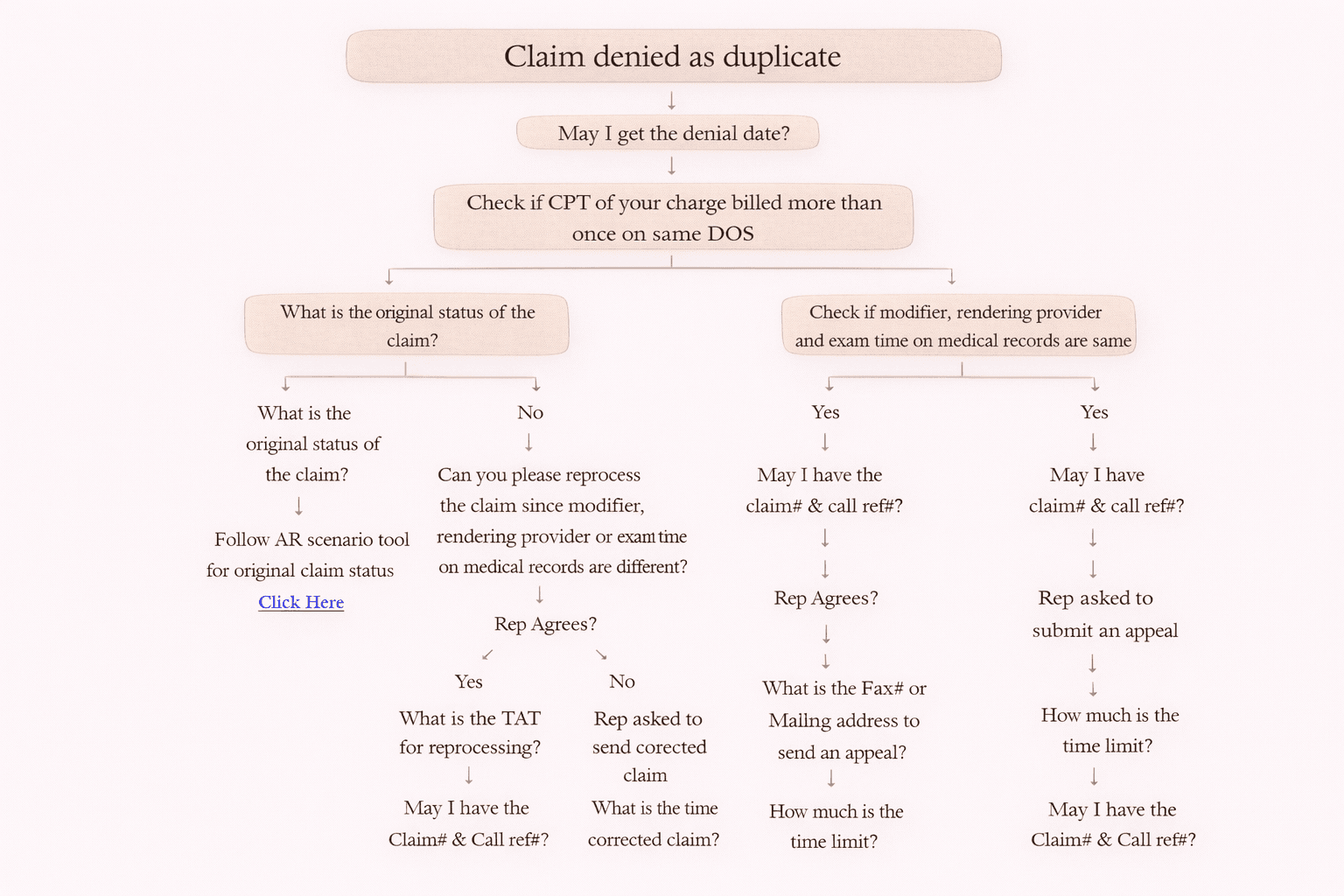
Denial Code 18: Exact Duplicate Claim/Service (Simple Guide for AR Teams)
Denial Code 18 – Exact Duplicate Claim/Service is one of the most common insurance denials faced in Medical Billing AR (Accounts Receivable). This denial usually happens when the same procedure/service is billed more than once for the same Date of Service (DOS).
In this guide, we will explain what this denial means, why it occurs, and how to resolve it step-by-step during payer calls.
What is Denial Code 18 (Exact Duplicate Claim/Service)?
A claim gets denied as Duplicate Service when:
• The same CPT code is billed more than once
• The billing is done on the same Date of Service (DOS)
• The payer finds the second submission as a duplicate
✅ Most of the time:
• The first claim processes successfully
• The second claim denies with Duplicate denial
Common Reasons for Duplicate Claim Denial
Here are the main reasons why Denial 18 occurs.
1. Same Claim Billed Twice by Mistake
Sometimes the billing team submits the same claim two times unintentionally.
2. Same CPT Billed More Than Once on Same DOS
This can happen if:
• Multiple exams/services are performed on the same day
• Charges are posted twice
• Modifiers were missed
On-Call Resolution Process (Step-by-Step)
When payer says: “Claim denied as duplicate,” follow this process.
Step 1: Ask for Denial Date
Question to payer:
✅ “May I get the denial date?”
This is important because appeal timelines are calculated from the denial date.
Step 2: Check if CPT is Billed More Than Once on Same DOS
Review charge details and confirm:
• Same CPT?
• Same Date of Service?
• More than one line item?
Scenario 1: CPT NOT billed more than once
If NO, then the denial may be incorrect.
✅ Next Action
• Ask payer: “What is the original status of the claim?”
• Follow AR Scenario tool based on the original claim status
Scenario 2: CPT billed more than once
If YES, then check if the duplicated lines are actually different services.
Step 3: Compare these in Medical Records
Check whether these are same or different:
• Modifier
• Rendering Provider
• Exam Time
If Modifier / Provider / Exam Time are DIFFERENT
This means it may not be a true duplicate. It could be valid separate services.
Ask payer for reprocessing.
✅ Script
“Can you please reprocess the claim since modifier/rendering provider/exam time are different in medical records?”
If Rep Agrees to Reprocess
Then ask:
• “What is the TAT for reprocessing?”
• “May I have the claim number & call reference number?”
📌 Action
• Set follow-up based on the TAT given by the representative.
If Rep Does NOT Agree
Now the payer may request one of the following.
Option A: Corrected Claim
Ask:
• “What is the timeframe to submit a corrected claim?”
• “May I have the claim number and call reference number?”
✅ Submit Corrected Claim with
• Correct modifier updates
• Frequency/Billing Code = 7 (Corrected Claim)
• Mention original claim number
Option B: Appeal
Ask:
• “What is the fax number or mailing address to send an appeal?”
• “What is the appeal time limit?”
• “May I have the claim number and call reference number?”
📌 Action
• Check denial date + appeal time limit
• If time limit crossed → write off unless the client asks to still submit
Corrected Claim Modifier Rules (Very Important)
When submitting a corrected claim:
If rendering providers are different
✅ Add Modifier 77 and resubmit
If rendering providers are same but exam times are different
✅ Add Modifier 76 and resubmit
Special Rule: Medicare Claims
🚨 Medicare does NOT accept corrected claims in many cases.
✅ Action
• Submit a fresh claim instead of a corrected claim
When to Void the Charge
If:
• Same CPT billed more than once
• Same DOS
• Same modifier
• Same provider
• Same exam time
➡️ Then it is truly a duplicate charge.
✅ Action
• Void the duplicate charge
Important Notes & Best Practices
• If CPT is not duplicated → follow original claim status workflow
• If payer refuses reprocess & asks for corrected claim → submit corrected claim properly with Code 7
• If corrected claim is denied again & payer refuses reprocess → submit appeal
• Always document:
o Claim #
o Call Reference #
o Denial Date
o Representative name (if possible)
o Next step and deadline
Conclusion
Denial Code 18 (Exact Duplicate Claim/Service) is easy to resolve if AR teams follow a structured workflow.
✅ Verify duplication
✅ Validate modifiers / provider / exam time
✅ Request reprocessing
✅ Submit corrected claim (Code 7) if needed
✅ File appeal within time limit
✅ Void truly duplicate charges
By following these steps, you can reduce rejections, improve claim turnaround time, and increase collections.