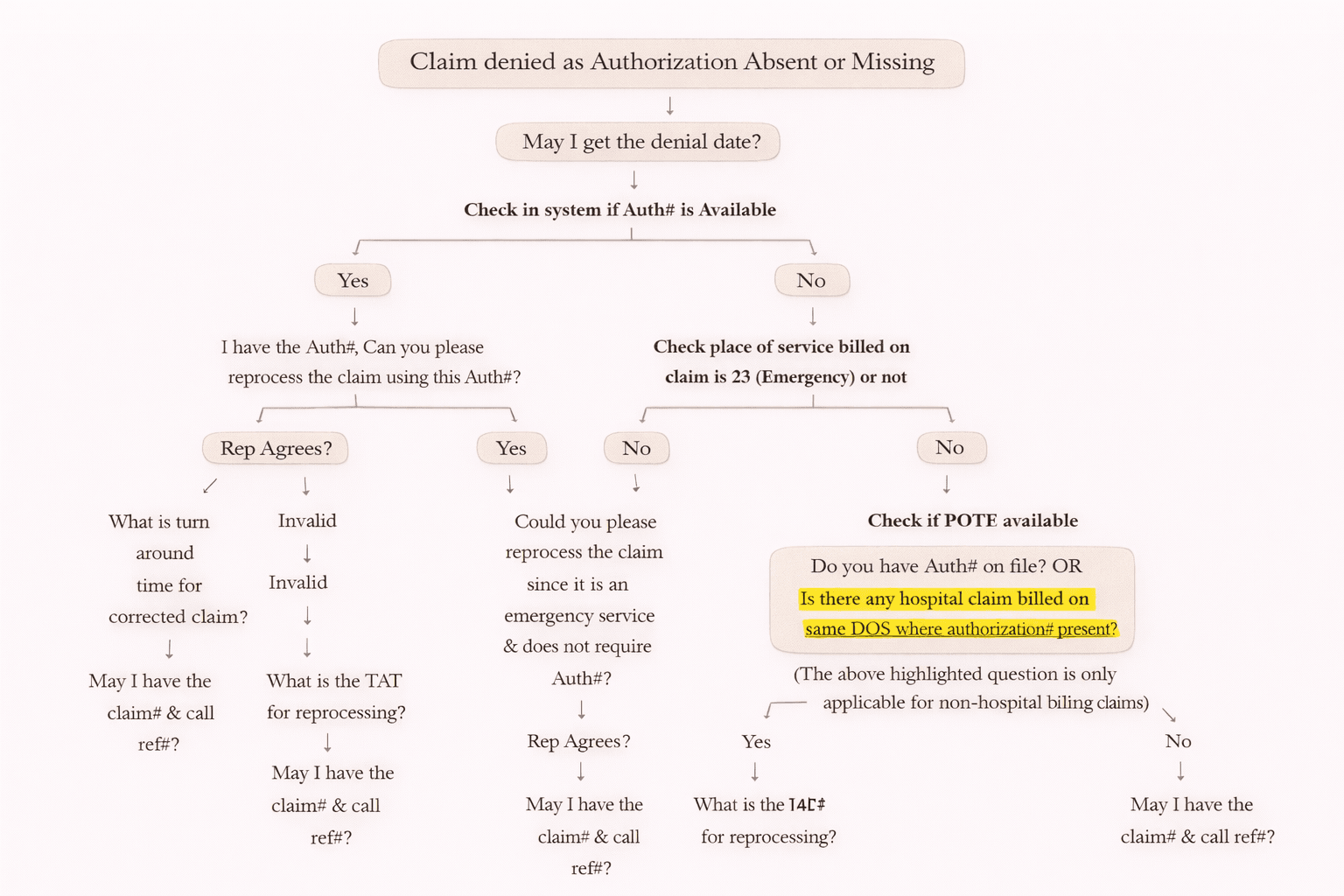
Denial Code 197: Precertification/Authorization Missing – Simple Guide (With Call Flow & Solutions)
If your medical claim gets denied with Denial Code 197, it usually means the insurance company is saying:
“Authorization / Precertification was required but not provided.”
This is one of the most common denials in medical billing, but the good news is: many 197 denials can be fixed and reprocessed if handled correctly.
In this blog, you will learn:
• What Denial Code 197 means
• Where to find the Authorization number (Auth#)
• Step-by-step call scenario for insurance
• What action to take based on the response
What is Denial Code 197?
Denial Code 197 = Precertification / Authorization / Notification / Pre-treatment Absent
This denial occurs when:
• Prior Authorization was required for the procedure/service
• But the provider did not submit the claim with the authorization number
• Or insurance did not find authorization on file
Where Can You Find the Authorization Number (Auth#)?
Before calling insurance, always check if you already have the Auth#.
Common places to find Auth#:
CMS1500 (Professional Claim Form)
• Box 23 = Authorization number
UB04 (Facility Claim Form)
• Locator 63 = Authorization number
Also, the Auth# may exist in:
• Client portal / internal system
• Hospital claim (same Date of Service)
• EviCore portal (for certain payers)
Important Note: Not Always an Auth Denial
Sometimes insurance reps say authorization is required because:
• Provider is Out of Network
In such cases:
• Do NOT treat it as denial 197
• Follow Denial Scenario 242: Services not provided by network/primary care providers
Types of Authorization (Easy Explanation)
1) Prior Authorization / Pre-Authorization
Authorization obtained before treatment/service is performed.
2) Retro Authorization
Authorization obtained after the treatment/service is already done.
Call Flow for Denial Code 197 (Simple Step-by-Step)
When you call the insurance company, follow this structured method:
Step 1: Confirm Denial
✅ Ask:
“The claim is denied due to missing authorization. May I get the denial date?”
Step 2: Check in Your System for Auth#
Now check your internal system/records.
✅ If Auth# is Available
Say:
“I have the authorization number. Can you please reprocess the claim using this Auth#?”
If Rep Agrees to Reprocess
Ask:
• “What is the turn around time (TAT) for reprocessing?”
• “May I have the claim number and call reference number?”
✅ Action
• Set follow-up for the given TAT.
If Rep Refuses to Reprocess
They may say:
• Submit corrected claim
Ask:
• “What is the time limit to send a corrected claim?”
• “May I have the claim number and call reference number?”
✅ Action
• Submit Corrected Claim
• Include Auth# correctly
• Use Corrected Claim Frequency Code = 7
• Mention original claim number
Step 3: If Auth# is NOT Available
Now we check whether it is emergency service.
✅ Check Place of Service (POS)
• If POS = 23 (Emergency Room) → Authorization usually NOT required.
Ask:
“Since this is emergency service (POS 23), could you please reprocess the claim?”
If Rep Agrees
Ask:
• “What is the TAT for reprocessing?”
• “May I have the claim number and call ref#?”
✅ Action
• Set follow-up for TAT.
Step 4: If POS is NOT 23 (Non-Emergency)
Ask the rep:
“Do you have any authorization number on file?”
OR
“Is there any hospital claim on same DOS where authorization is present?”
(This question is mainly for non-hospital billing claims.)
If Rep Finds Auth# (in their system/hospital claim)
Ask:
“Could you please use that authorization number and send the claim back for reprocessing?”
✅ Action
• Follow-up with TAT.
If Rep Cannot Find Auth# → Ask About Retro Auth
Ask:
“Is it possible to obtain a retro authorization for this service?”
If Retro Authorization is Possible
Ask:
• Procedure to obtain retro auth
• Which form needs to be filled
• Required documents
• Fax number or mailing address
• Time limit to submit
Always take:
✅ Claim number + call reference number
✅ Action
• Fill retro-auth form
• Attach documents
• Send to payer
• If documents missing → request from client
If Retro Authorization is NOT Possible
Then the usual outcome is:
✅ Claim must be written off
However:
• Some clients request appeal even if chances are low
Ask:
• Fax/Mailing address to send appeal
• Appeal time limit
• Claim# and call ref#
✅ Action
• Work as per client instructions
Extra Tip: Check EviCore for Auth#
Some payers use EviCore for authorizations.
EviCore helps to find:
• Approved Auth#
• CPT-specific approvals
• Approved time period
If you have portal access:
✅ Check directly online.
If insurance asks:
✅ Call EviCore and get authorization details.
Quick Summary: What To Do for Denial Code 197
Situation — Best Action
Auth# available and rep agrees
Reprocess claim + set follow-up
Auth# available but rep refuses
Send corrected claim (Code 7)
Auth# not available + emergency POS 23
Ask for reprocess (no auth required)
Auth# not available + rep finds auth
Use found auth + reprocess
Auth# not available + retro possible
Submit retro-auth form + documents
Auth# not available + retro not possible
Write off or appeal as per client
Final Billing Reminder
Always collect these during the call:
✅ Denial date
✅ Claim number
✅ Call reference number
✅ Reprocessing TAT or corrected claim time limit
✅ Fax/Mailing address (if appeal/retro auth needed)